

Squadcast is a top-tier podcast recording tool known for its high-quality audio and user-friendly interface. It excels in remote interviews.
Squadcast offers podcasters a seamless experience for recording remote interviews with crystal-clear audio quality. The platform is designed to be intuitive, making it easy for users to navigate and utilize its features. Squadcast supports multi-track recording, ensuring that each participant’s audio is captured separately for better editing.
It also provides robust integration with popular podcast editing software, streamlining the post-production process. With its reliable cloud storage, users can access their recordings anytime, ensuring their content is safe and easily retrievable. Overall, Squadcast is a valuable tool for both amateur and professional podcasters aiming for top-notch audio quality.
What is Squadcast
Squadcast is a cloud-based podcast recording platform that enables high-quality remote recordings. It is designed to ensure studio-quality audio without the need for complex setups. The platform caters to podcasters who need a reliable and straightforward solution for recording interviews and discussions remotely.
Features
Squadcast comes packed with a variety of features aimed at enhancing your podcasting experience. Some of the standout features include:
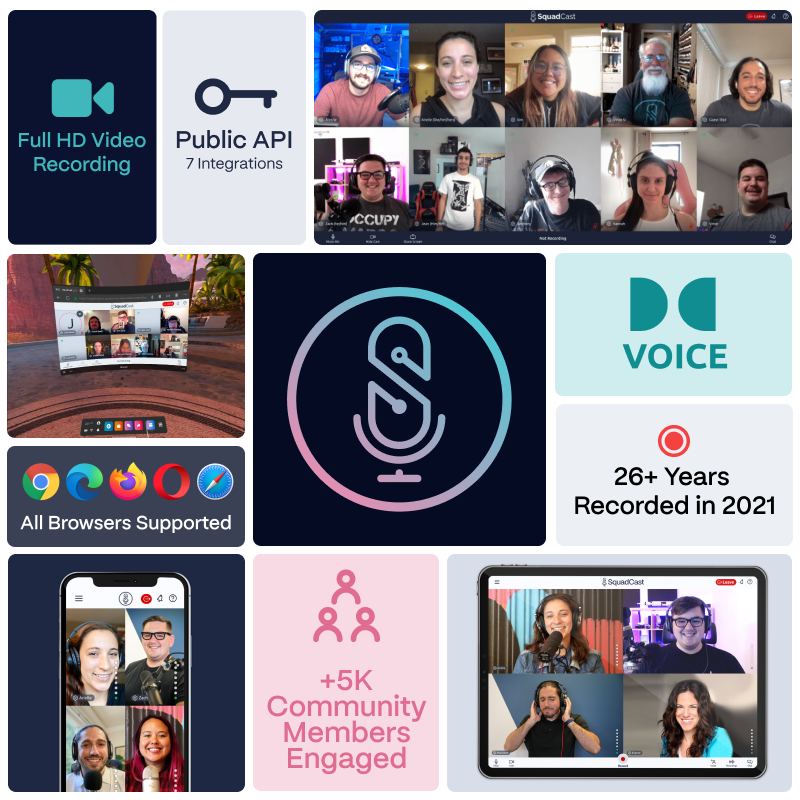
- High-Quality Audio: Records WAV audio files for crisp and clear sound.
- Cloud Recording: Ensures recordings are saved and secured in the cloud.
- Multiple Guests: Allows up to four participants to join a recording session.
- Video Integration: Provides video chat to see and interact with guests.
- Progressive Uploads: Uploads audio while recording, minimizing data loss.
User Experience
Squadcast offers a user-friendly interface that is intuitive and easy to navigate. The setup process is quick, allowing podcasters to focus more on content rather than technical issues. Participants can join sessions with just a click, making it accessible even for those who are not tech-savvy.
| Feature | Benefit |
|---|---|
| High-Quality Audio | Ensures professional sound quality |
| Cloud Recording | Keeps recordings safe and accessible |
| Multiple Guests | Facilitates group discussions |
| Video Integration | Enhances interaction between participants |
| Progressive Uploads | Reduces risk of losing data |
Pricing
Squadcast offers several pricing plans to suit different needs and budgets. Here’s a quick overview:
- Indie Plan: Perfect for individual podcasters, starting at $10/month.
- Pro Plan: Ideal for professional podcasters, starting at $20/month.
- Studio Plan: Best for podcast networks, starting at $45/month.
Credit: squadcast.fm
Key Features
Squadcast is a powerful platform designed to help teams manage incidents effectively. Its rich set of features ensures that organizations can address issues swiftly and efficiently. In this section, we will explore the key features that make Squadcast an essential tool for incident management.
Incident Management
Squadcast excels in incident management, offering tools that streamline the process from detection to resolution. The platform provides a centralized dashboard where teams can monitor incidents in real-time. This helps in maintaining a unified view of all ongoing issues.
Key features of Incident Management include:
- Real-time Monitoring: Keeps track of incidents as they occur.
- Root Cause Analysis: Helps identify the underlying cause of issues.
- Post-Incident Reviews: Facilitates learning from incidents to prevent future occurrences.
Squadcast also offers customizable workflows, allowing teams to define specific steps for incident resolution. This ensures consistency and efficiency in handling various types of incidents.
| Feature | Description |
|---|---|
| Real-time Monitoring | Tracks incidents as they happen, providing immediate updates. |
| Root Cause Analysis | Identifies the underlying cause of issues to prevent recurrence. |
| Post-Incident Reviews | Allows teams to learn from past incidents and improve future responses. |
Alerting System
The alerting system in Squadcast ensures that the right people are notified at the right time. It supports multiple channels for alerts, including SMS, email, and push notifications. This ensures that team members are always aware of critical issues.
Key features of the Alerting System include:
- Multi-Channel Alerts: Ensures notifications are received regardless of location.
- Escalation Policies: Automatically escalates issues if not addressed within a specified time.
- On-Call Scheduling: Manages on-call rotations to ensure coverage.
Squadcast’s alerting system is highly customizable. Teams can set up specific alert rules and conditions, ensuring that only relevant alerts are sent. This minimizes alert fatigue and ensures timely responses to critical issues.
| Feature | Description |
|---|---|
| Multi-Channel Alerts | Delivers notifications via SMS, email, and push notifications. |
| Escalation Policies | Automatically escalates unresolved issues to higher levels. |
| On-Call Scheduling | Manages and automates on-call rotations for team members. |
Integrations
Squadcast offers a wide range of integrations with popular tools and platforms. This ensures seamless workflows and better incident management. Integrations include monitoring tools, communication platforms, and ticketing systems.
Key integrations available in Squadcast include:
- Monitoring Tools: Integrates with tools like Datadog, New Relic, and Prometheus.
- Communication Platforms: Connects with Slack, Microsoft Teams, and Google Chat.
- Ticketing Systems: Works with Jira, ServiceNow, and Zendesk.
These integrations help in creating a unified incident management ecosystem. Teams can receive alerts, communicate, and resolve incidents without switching between different tools.
| Integration | Tools/Platforms |
|---|---|
| Monitoring Tools | Datadog, New Relic, Prometheus |
| Communication Platforms | Slack, Microsoft Teams, Google Chat |
| Ticketing Systems | Jira, ServiceNow, Zendesk |
User Interface
Squadcast is a powerful platform designed for podcasters. One of its standout features is its user interface. An intuitive and well-designed interface can significantly enhance the user experience. Let’s dive into the specifics of Squadcast’s user interface, focusing on design and usability, and the navigation experience.
Design And Usability
Squadcast boasts a sleek and modern design. The clean layout immediately catches the eye and makes the platform inviting. Colors are thoughtfully chosen to be easy on the eyes, ensuring long recording sessions don’t strain the users.
Usability is top-notch with Squadcast. Key features are readily accessible, reducing the learning curve for new users. The dashboard is well-organized, displaying essential tools and options without clutter.
- Simple and clear icons that guide users effortlessly.
- Responsive design that adapts to different screen sizes.
- Drag-and-drop functionality for easy file management.
A key highlight is the ease of setting up recording sessions. Users can create sessions with a few clicks and invite guests seamlessly. Audio and video quality settings are straightforward, allowing for quick adjustments.
| Feature | Benefit |
|---|---|
| Simple Icons | Easy to identify and use |
| Responsive Design | Works well on all devices |
| Drag-and-Drop | Streamlines file management |
Overall, the design and usability of Squadcast make it a pleasure to use. Users can focus on creating content without being bogged down by a complicated interface.
Navigation Experience
Navigation on Squadcast is designed to be intuitive. Users can effortlessly move between different sections. The menu structure is logical, with clear labels for each section.
The main dashboard acts as a central hub. Users can quickly access their sessions, recordings, and settings from here. Breadcrumb navigation is implemented, ensuring users always know their location within the platform.
- Home – Access to recent activities and quick actions.
- Sessions – View and manage upcoming and past sessions.
- Recordings – Access and manage recorded content.
Search functionality is robust, allowing users to find specific recordings or sessions swiftly. Filters and sorting options enhance this feature, making it easy to locate content based on criteria like date or guest.
Hotkeys and shortcuts are another great addition. Users can perform common tasks with keyboard shortcuts, boosting efficiency. Tooltips and help icons are present throughout, providing guidance and tips for new users.
In summary, the navigation experience on Squadcast is seamless. Users can find what they need without hassle, ensuring a smooth and productive workflow.

Credit: www.squadcast.com
Performance Metrics
In this Squadcast review, we dive into the performance metrics of this powerful incident management tool. Performance metrics are vital for evaluating the efficiency and reliability of any monitoring system. Let’s explore key aspects like response time and uptime statistics to see how Squadcast performs.
Response Time
Response time is crucial for any incident management tool. Squadcast excels in this area, ensuring quick detection and notification of incidents. This fast response helps teams act promptly and mitigate issues before they escalate. Here are some key points about Squadcast’s response time:
- Average Response Time: Squadcast boasts an average response time of under 2 minutes.
- Real-time Alerts: The tool sends real-time alerts through various channels like email, SMS, and push notifications.
- Customizable Alerts: Users can customize alert settings to prioritize critical incidents.
Below is a table summarizing Squadcast’s response time performance:
| Metric | Performance |
|---|---|
| Average Response Time | < 2 minutes |
| Notification Channels | Email, SMS, Push |
| Customizable Alerts | Yes |
These metrics show how Squadcast ensures swift action, reducing downtime and improving service reliability.
Uptime Statistics
Uptime statistics are another critical performance metric. Squadcast guarantees high availability, ensuring your systems are always monitored. This reliability is essential for maintaining trust and service quality. Key uptime statistics for Squadcast include:
- Guaranteed Uptime: Squadcast offers a 99.99% uptime guarantee, ensuring continuous monitoring.
- Redundancy: The tool has built-in redundancy to prevent single points of failure.
- Automatic Failover: In case of a failure, Squadcast automatically switches to backup systems.
Here is a table summarizing Squadcast’s uptime performance:
| Metric | Performance |
|---|---|
| Guaranteed Uptime | 99.99% |
| Redundancy | Yes |
| Automatic Failover | Yes |
These uptime statistics demonstrate Squadcast’s commitment to reliable service, ensuring your systems are always protected.
Pricing Plans
When considering Squadcast for your podcasting needs, understanding the pricing plans is crucial. Squadcast offers various options to cater to different budgets and requirements. This ensures that you can find a plan that fits your needs while providing all the essential features.
Free Trial
Squadcast provides a generous 7-day free trial for new users. This allows you to explore the platform without any financial commitment. During the trial, you get access to all the premium features, helping you make an informed decision.
Here’s what you can expect during the free trial:
- Unlimited recording sessions – Test as many sessions as you want.
- High-quality audio and video – Experience the best recording quality.
- Multitrack recording – Get separate audio tracks for each participant.
- Cloud storage – Store your recordings securely in the cloud.
- Customer support – Access to Squadcast’s responsive customer service.
To start your free trial, simply sign up on the Squadcast website. No credit card is required, making it a risk-free opportunity to explore all the features and benefits.
Subscription Options
After the free trial, Squadcast offers several subscription options to suit different needs and budgets. Each plan provides a range of features to enhance your podcasting experience. Here’s a breakdown of the available plans:
| Plan | Monthly Price | Yearly Price | Key Features |
|---|---|---|---|
| Indie | $10/month | $100/year |
|
| Pro | $20/month | $200/year |
|
| Studio | $40/month | $400/year |
|
Each plan also comes with a range of additional features to enhance your podcasting experience. Depending on your needs, you can choose a plan that offers the best value for your requirements.

Credit: www.youtube.com
Customer Feedback
Squadcast is a popular podcast recording platform known for its high-quality audio and seamless user experience. To understand its impact, we delved into customer feedback. This section highlights what users love about Squadcast and where they think it falls short.
Positive Reviews
Many customers have praised Squadcast for its user-friendly interface and exceptional audio quality. Here are some key points from the positive reviews:
- High-Quality Audio: Users consistently mention the crystal-clear audio that Squadcast provides, making it a top choice for podcasters.
- Easy to Use: The platform is intuitive, allowing users to start recording with minimal setup.
- Reliable Connection: Squadcast offers a stable connection, reducing the chances of dropped calls or audio glitches.
- Excellent Customer Support: Many users appreciate the responsive and helpful support team.
Here’s a snapshot of user ratings:
| Feature | Rating |
|---|---|
| Audio Quality | 4.8/5 |
| User Interface | 4.7/5 |
| Reliability | 4.6/5 |
| Customer Support | 4.9/5 |
Common Criticisms
Despite the positive feedback, some users have shared common criticisms about Squadcast. Here are the main points:
- Price: Some users feel that the pricing is high compared to other podcast recording platforms.
- Limited Features: A few users have expressed the need for more advanced editing tools within the platform.
- Learning Curve: While the interface is user-friendly, some beginners find it challenging to navigate initially.
- Browser Compatibility: There are occasional issues with certain browsers, which can be frustrating for some users.
Here’s a summary of user concerns:
| Issue | Frequency |
|---|---|
| High Pricing | Moderate |
| Feature Limitations | Low |
| Initial Learning Curve | Moderate |
| Browser Issues | Low |
Overall, while Squadcast receives glowing reviews for its audio quality and user experience, there are areas where users see room for improvement.
Frequently Asked Questions
What Is Squadcast?
Squadcast is an incident management tool designed to help teams respond to and resolve IT incidents efficiently.
How Does Squadcast Work?
Squadcast integrates with monitoring tools, alerts teams about incidents, and provides a platform for collaboration and resolution.
Is Squadcast Suitable For Small Teams?
Yes, Squadcast offers scalable features that cater to the needs of both small teams and large enterprises.
Does Squadcast Support Multiple Integrations?
Yes, Squadcast supports a wide range of integrations with popular monitoring, chat, and workflow tools.
What Are The Key Features Of Squadcast?
Key features include incident alerting, on-call management, post-incident analysis, and seamless integrations with existing tools.
Conclusion
Squadcast is a powerful tool for podcast creators. It offers seamless recording and high-quality audio. Its user-friendly interface makes remote collaboration easy. Consider Squadcast for your podcasting needs. It enhances productivity and ensures professional results. Try Squadcast and elevate your podcast to the next level.

