
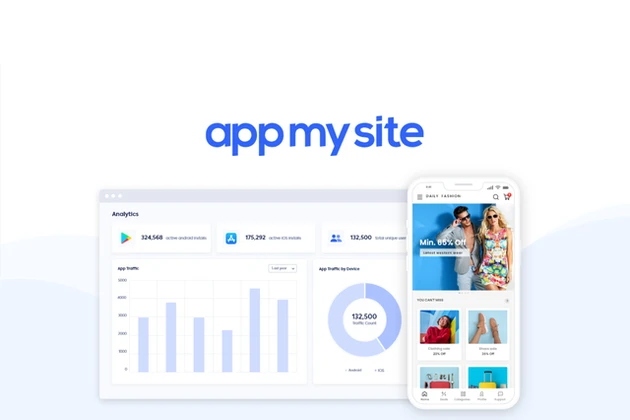
AppMySite Review: The Ultimate No-Code App Builder
Welcome to our comprehensive review of AppMySite, a no-code app builder that promises to help you create Android and iOS apps in minutes. Whether you’re a small business owner, a developer, or just someone looking to bring your app idea to life, this review will provide you with all the information you need to determine if AppMySite is the right tool for you.
We’ll cover everything from key features and benefits to potential drawbacks and pricing details.
By the end of this review, you’ll have a clear understanding of what AppMySite offers and whether it aligns with your needs.
Let’s dive in!
What is AppMySite?
AppMySite is a no-code app builder designed to help users create professional Android and iOS apps without any coding knowledge. It transforms your website into a fully functional mobile app, making it easier for businesses to reach a wider audience.
With AppMySite, you can convert your WordPress or WooCommerce site into a mobile app, ensuring a seamless user experience across all platforms.
The tool is particularly useful for businesses looking to expand their digital presence and engage with customers on mobile devices.
Key Features of AppMySite
AppMySite offers a range of features that make it a powerful tool for app creation. Below, we dive into some of the standout features that set it apart:
Easy Customization
AppMySite offers a user-friendly interface that allows you to customize your app’s design, layout, and functionality with ease. You can choose from a variety of templates and customize them to match your brand’s identity.
The platform’s drag-and-drop interface ensures that even beginners can create a professional-looking app. Customization options include changing colors, fonts, and adding custom graphics to align with your brand guidelines.
Seamless Integration
The platform supports seamless integration with WordPress and WooCommerce, making it easy to convert your website into a mobile app. This ensures that your app is always in sync with your website, reducing the need for manual updates.
With real-time synchronization, any changes made to your website are automatically reflected in your app, ensuring consistency and saving you time and effort.
👍 Get AppMySite Lifetime Deal!
Real-Time Preview
AppMySite provides a real-time preview feature, allowing you to see changes as you make them. This helps you visualize your app’s design and make necessary adjustments before publishing.
The real-time preview is invaluable for ensuring that your app meets your expectations before going live. It allows you to test different designs and functionalities without the need for multiple iterations.
Benefits of Using AppMySite
Using AppMySite comes with several benefits, including:
- No coding skills required: Ideal for non-tech-savvy users who want to create an app without learning to code.
- Quick and easy app creation: The platform’s intuitive interface allows you to build an app within minutes.
- Cost-effective solution for small businesses: Affordable pricing plans make it accessible for businesses with limited budgets.
- Enhanced customer engagement: A mobile app can provide a more interactive and personalized experience for your customers.
- Increased brand visibility: Having a mobile app can help you reach a broader audience and increase brand awareness.
Potential Drawbacks
While AppMySite offers numerous advantages, it’s important to consider potential drawbacks:
- Limited customization options compared to custom app development: For highly specific design and functionality needs, a custom-built app might be more suitable.
- Dependence on the platform for updates and maintenance: You rely on AppMySite for updates and bug fixes, which could be a limitation for some users.
- May not be suitable for complex app requirements: If your app requires advanced features or integrations, you might find AppMySite’s capabilities limiting.
Pricing Details
AppMySite offers various pricing plans to cater to different needs. Below is a summary of the pricing details:
| Plan | Monthly Price | Annual Price | Features |
|---|---|---|---|
| Starter | $9 | $99 | Basic features, limited customization |
| Pro | $19 | $199 | Advanced features, more customization |
| Premium | $29 | $299 | All features, unlimited customization |
For the latest pricing and more detailed information, visit the AppMySite website.
Who Would Benefit from AppMySite?
AppMySite is ideal for:
- Small business owners looking to expand their digital presence: A mobile app can help reach new customers and engage existing ones more effectively.
- E-commerce entrepreneurs using WooCommerce: Convert your online store into a mobile app to offer a better shopping experience.
- Bloggers and content creators who want to reach a mobile audience: Engage your readers on the go with a mobile app version of your blog.
- Individuals with app ideas but no coding skills: Bring your app idea to life without needing to learn programming.
Comparisons with Other No-Code App Builders
To help you make an informed decision, here’s a comparison of AppMySite with other popular no-code app builders:
- Adalo: Known for its simplicity and ease of use, Adalo is great for building basic apps quickly.
- Bubble: Offers more advanced features and customization options, making it suitable for complex app requirements.
- Thunkable: Ideal for educational purposes and simple app projects, Thunkable is user-friendly and intuitive.
Each of these platforms has its own strengths and weaknesses, so it’s important to consider your specific needs before making a choice.
Buyer’s Guide: What to Look for in a No-Code App Builder
When choosing a no-code app builder, consider the following factors:
- Ease of use: Ensure the platform is user-friendly and does not require a steep learning curve.
- Customization options: Look for a builder that offers a range of customization features to match your brand.
- Integration capabilities: Check if the platform integrates with your existing systems and tools.
- Pricing and value for money: Compare pricing plans to find the best value for your budget.
- Customer support and community: Opt for a platform with reliable customer support and an active community for troubleshooting.
Actionable Tips for Building Your First App
Here are some tips to help you get started with AppMySite:
- Define your app’s purpose and target audience: Clearly outline what you want your app to achieve and who it is for.
- Choose a template that aligns with your brand: Select a template that reflects your brand’s identity and customize it accordingly.
- Customize your app’s design and functionality: Use the platform’s tools to create a unique and functional app.
- Test your app thoroughly before publishing: Ensure all features work correctly and the user experience is smooth.
- Promote your app through social media and other channels: Use various marketing strategies to reach your target audience.
Expert Insights
In the rapidly evolving app market, no-code app builders like AppMySite are becoming increasingly popular. They democratize app development, making it accessible to a broader audience. However, it’s crucial to understand the limitations and potential risks associated with these platforms.
One common misconception is that no-code app builders can replace custom app development entirely. While they are excellent for basic to moderately complex apps, they may fall short for highly specialized requirements. It’s essential to evaluate your needs carefully before choosing a no-code solution.
Additionally, dependence on the platform for updates and maintenance can be a double-edged sword. While it simplifies the process, it also means you are at the mercy of the platform’s development timeline for new features and bug fixes.
FAQs
Q: Do I need any coding knowledge to use AppMySite?
A: No, AppMySite is a no-code app builder, meaning you don’t need any coding skills to create your app. The platform’s user-friendly interface and drag-and-drop functionality make it accessible for beginners.
Q: Can I integrate my WordPress site with AppMySite?
A: Yes, AppMySite offers seamless integration with WordPress and WooCommerce, making it easy to convert your website into a mobile app. This ensures that your app is always in sync with your website.
Q: Is there a free trial available?
A: Yes, AppMySite offers a free trial allowing you to explore the platform’s features before committing to a paid plan. This is a great way to test the waters and see if the platform meets your needs.
Q: What kind of support does AppMySite offer?
A: AppMySite provides customer support through email and a comprehensive knowledge base to help users with any issues they may encounter. The platform’s community forums are also a valuable resource for troubleshooting and tips.
Q: Can I customize my app’s design?
A: Yes, AppMySite offers a variety of templates and customization options, allowing you to create an app that matches your brand’s identity. You can customize colors, fonts, and add custom graphics to make your app unique.
Conclusion
AppMySite is a powerful no-code app builder that makes it easy for anyone to create professional Android and iOS apps. With its user-friendly interface, seamless integration, and real-time preview feature, it’s an excellent choice for small businesses, e-commerce entrepreneurs, and content creators.
While it may not be suitable for complex app requirements, AppMySite offers a cost-effective and efficient solution for those looking to expand their digital presence. If you’re considering building a mobile app, AppMySite is definitely worth a try.
Ready to get started? 👍 Get AppMySite Lifetime Deal!

