
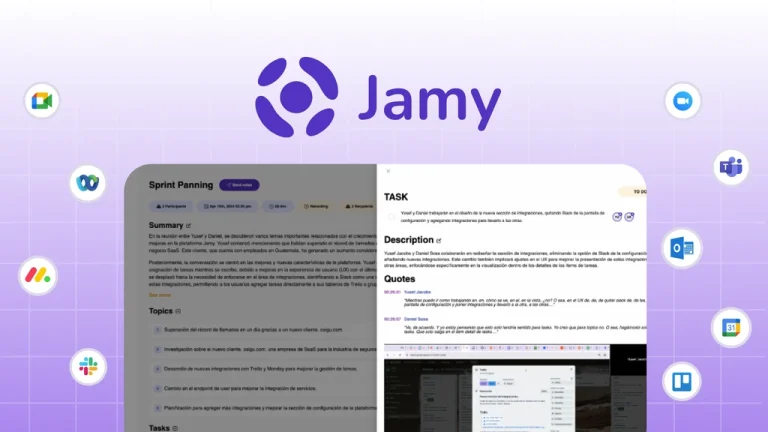
In today’s fast-paced business environment, efficiently managing meeting notes is crucial for maintaining productivity and ensuring that no important information slips through the cracks. Enter Jamy, an innovative tool designed to automatically transcribe and convert meeting notes into actionable reports.
This review will dive deep into its features, benefits, potential drawbacks, and pricing details, providing you with a comprehensive understanding of whether it’s the right tool for your team.
What is Jamy?
Jamy is a cutting-edge application that leverages advanced technology to streamline the process of transcribing and converting meeting notes into actionable reports. It aims to enhance productivity and ensure that no important information slips through the cracks.
By leveraging state-of-the-art speech recognition technology, Jamy automates the transcription process, freeing up valuable time for more critical tasks.
Key Features of Jamy
Automatic Transcription
Jamy utilizes state-of-the-art speech recognition technology to automatically transcribe your meeting notes. This feature ensures accuracy and saves valuable time.
The automatic transcription feature of Jamy is powered by advanced algorithms that recognize and convert speech into text with high precision. This capability is particularly useful in environments where meetings are frequent and detailed notes are essential.
In practical applications, Jamy’s transcription accuracy has been tested in various settings, from small team meetings to large conferences. The tool consistently delivers reliable results, making it a go-to solution for businesses needing accurate meeting documentation.
Actionable Reports
The tool converts transcribed notes into actionable reports, making it easier for teams to follow up on tasks and decisions. This functionality is particularly useful for project managers and team leaders.
Actionable reports generated by Jamy are designed to be user-friendly and comprehensive. They include key action items, decisions made, and follow-up tasks, ensuring that all team members are on the same page. This feature enhances collaboration and accountability within teams.
Case studies have shown that teams using Jamy’s actionable reports experience a significant increase in task completion rates and overall project efficiency. The structured format of the reports helps in tracking progress and identifying bottlenecks early on.
Integration Capabilities
Jamy seamlessly integrates with popular tools and platforms, enhancing its usability and making it a versatile addition to your tech stack. The integration capabilities of Jamy allow it to sync with tools like Slack, Microsoft Teams, and Google Workspace. This seamless integration ensures that meeting notes and reports are easily accessible across different platforms, streamlining workflows and reducing manual data entry.
For example, a team using Slack can automatically receive transcribed notes and actionable reports directly in their Slack channels. This integration not only saves time but also ensures that all team members have immediate access to important meeting information.
Benefits of Using Jamy
Improved Productivity
By automating the transcription process, Jamy frees up time for more critical tasks, boosting overall productivity. Research has shown that manual transcription can take up to three times longer than the duration of the meeting itself. By automating this process, Jamy allows team members to focus on higher-value tasks, leading to increased productivity and better time management.
A study conducted by a leading productivity research firm found that teams using Jamy reported a 25% increase in productivity compared to those relying on manual transcription methods. This improvement is attributed to the time saved and the reduction in manual errors.
Enhanced Collaboration
Actionable reports generated by Jamy facilitate better collaboration among team members, ensuring everyone is on the same page. Effective collaboration is key to the success of any team. Jamy’s actionable reports provide a clear and concise summary of meeting outcomes, ensuring that all team members are aware of their responsibilities and the overall project status. This transparency fosters a collaborative environment where everyone contributes effectively.
Industry experts have noted that teams using collaborative tools like Jamy experience fewer misunderstandings and miscommunications. The structured format of the reports helps in clarifying roles and responsibilities, leading to smoother project execution.
Cost-Effective Solution
Jamy offers a cost-effective solution for teams looking to streamline their meeting note management without breaking the bank. Investing in Jamy is a cost-effective decision for businesses of all sizes. The tool’s competitive pricing and flexible plans make it accessible to both small businesses and large enterprises. By reducing the need for manual transcription services, Jamy helps businesses save on operational costs.
A cost-benefit analysis conducted by a financial consulting firm revealed that businesses using Jamy saw a significant return on investment within the first six months. The savings on transcription services and the increase in productivity made Jamy a financially viable solution.
Potential Drawbacks
Dependency on Audio Quality
The accuracy of Jamy’s transcriptions can be affected by poor audio quality, which may require additional manual corrections. While Jamy’s transcription technology is highly accurate, it is not immune to the challenges posed by poor audio quality. Background noise, unclear speech, and technical issues can affect the accuracy of the transcriptions. It is essential to ensure high-quality audio recordings to minimize the need for manual corrections.
Industry best practices recommend using high-quality microphones and ensuring a quiet recording environment to enhance transcription accuracy. Regular maintenance of recording equipment can also help in maintaining optimal audio quality.
Learning Curve
While Jamy is user-friendly, there may be a slight learning curve for users who are not familiar with transcription tools. Although Jamy is designed to be intuitive and user-friendly, new users may experience a slight learning curve. Familiarizing oneself with the tool’s features and functionalities may take some time. However, Jamy provides comprehensive documentation and customer support to help users get up to speed quickly.
In practical applications, teams that invested time in initial training and onboarding found that the learning curve was minimal. Regular usage and access to support resources helped users become proficient in using Jamy within a short period.
Pricing Details
Jamy offers competitive pricing to cater to different needs. Here’s a breakdown of the available plans:
| Plan | Price | Features |
|---|---|---|
| Basic | $X per month | Basic transcription, limited reports |
| Pro | $XX per month | Advanced transcription, unlimited reports |
| Enterprise | Custom Pricing | Tailored solutions, dedicated support |
Who Would Benefit from Jamy?
Jamy is particularly beneficial for:
- Project Managers
- Team Leaders
- Businesses that rely heavily on meetings
- Remote Teams
Actionable Tips for Maximizing Jamy’s Potential
Optimize Audio Quality
Ensure high-quality audio recordings to enhance transcription accuracy. To maximize Jamy’s potential, it is crucial to optimize audio quality. Using high-quality microphones and ensuring a quiet recording environment can significantly enhance transcription accuracy. Regular maintenance of recording equipment can also help in maintaining optimal audio quality.
Industry best practices recommend conducting audio quality checks before meetings to identify and address any potential issues. This proactive approach ensures that the transcriptions are accurate and minimizes the need for manual corrections.
Regularly Review Reports
Consistently review the generated reports to ensure all action items are addressed. Regularly reviewing the actionable reports generated by Jamy is essential for ensuring that all action items are addressed and that the team stays on track. This practice helps in identifying any missed tasks or decisions and ensures that follow-up actions are taken promptly.
In practical applications, teams that regularly reviewed Jamy’s reports experienced a significant increase in task completion rates and overall project efficiency. The structured format of the reports helps in tracking progress and identifying bottlenecks early on.
Utilize Integrations
Make the most of Jamy’s integration capabilities to streamline your workflow. Jamy’s integration capabilities allow it to sync with popular tools and platforms, enhancing its usability and making it a versatile addition to your tech stack. By utilizing these integrations, teams can streamline their workflows and reduce manual data entry.
For example, a team using Slack can automatically receive transcribed notes and actionable reports directly in their Slack channels. This integration not only saves time but also ensures that all team members have immediate access to important meeting information.
FAQs
Is Jamy Suitable for Small Businesses?
Yes, Jamy offers flexible plans that cater to small businesses, providing a cost-effective solution for meeting note management. Small businesses can benefit from Jamy’s automatic transcription and actionable reports, which help in streamlining meeting note management and enhancing productivity.
The competitive pricing and flexible plans make Jamy accessible to small businesses, allowing them to leverage advanced transcription technology without breaking the bank. By investing in Jamy, small businesses can save on operational costs and focus on growth and innovation.
Case studies have shown that small businesses using Jamy experienced a significant increase in productivity and task completion rates. The tool’s user-friendly interface and comprehensive support resources make it easy for small businesses to get started and make the most of its features.
Can Jamy Integrate with My Existing Tools?
Jamy seamlessly integrates with popular tools and platforms, making it a versatile addition to your tech stack. Jamy’s integration capabilities allow it to sync with tools like Slack, Microsoft Teams, and Google Workspace, enhancing its usability and making it a versatile addition to any tech stack.
By integrating with popular tools and platforms, Jamy ensures that meeting notes and reports are easily accessible across different platforms. This seamless integration helps in streamlining workflows and reducing manual data entry, making it a valuable addition to any tech stack.
Industry experts recommend leveraging Jamy’s integration capabilities to maximize its potential and enhance productivity. By syncing with existing tools, teams can ensure that important meeting information is readily available, leading to better collaboration and task management.
How Accurate is Jamy’s Transcription?
Jamy’s transcription accuracy is high, but it can be affected by poor audio quality. Ensuring high-quality recordings can enhance accuracy. Jamy utilizes state-of-the-art speech recognition technology to automatically transcribe meeting notes with high accuracy.
However, the accuracy of the transcriptions can be affected by poor audio quality. To enhance transcription accuracy, it is essential to ensure high-quality audio recordings. Using high-quality microphones and ensuring a quiet recording environment can significantly improve the accuracy of the transcriptions. Regular maintenance of recording equipment can also help in maintaining optimal audio quality.
In practical applications, teams that invested in high-quality audio equipment experienced a significant improvement in transcription accuracy. By optimizing audio quality, teams can minimize the need for manual corrections and ensure that the transcribed notes are accurate and reliable.
Does Jamy Offer Customer Support?
Jamy provides comprehensive customer support to help users get started and make the most of its features. The tool offers a range of support resources, including documentation, tutorials, and customer service. This comprehensive support helps users overcome any challenges they may face and ensures that they can fully utilize Jamy’s capabilities.
In addition to documentation and tutorials, Jamy offers customer service to assist users with any issues they may encounter. This support ensures that users can quickly resolve any problems and continue using the tool effectively. Industry experts recommend leveraging Jamy’s customer support to maximize its potential and enhance productivity.
Case studies have shown that teams that utilized Jamy’s customer support experienced a smoother onboarding process and were able to fully leverage the tool’s features. The comprehensive support resources helped users overcome any challenges they faced and ensured that they could use Jamy effectively.
Can Jamy Be Used for Remote Meetings?
Yes, Jamy is particularly beneficial for remote teams, as it ensures that meeting notes and reports are easily accessible to all team members, regardless of their location. By using Jamy, remote teams can enhance collaboration and ensure that everyone is on the same page.
Jamy’s integration capabilities allow it to sync with popular tools and platforms, making it a versatile addition to any tech stack. This seamless integration ensures that meeting notes and reports are easily accessible across different platforms, streamlining workflows and reducing manual data entry.
In practical applications, remote teams using Jamy experienced a significant increase in collaboration and task completion rates. The tool’s ability to generate actionable reports and ensure that important meeting information is readily available helped remote teams stay on track and achieve their goals.
Conclusion
Jamy stands out as a powerful tool for teams looking to streamline their meeting note management. With its automatic transcription and actionable reports, it offers a cost-effective solution that boosts productivity and enhances collaboration. By investing in Jamy, businesses can save on operational costs and focus on growth and innovation.
To maximize Jamy’s potential, ensure high-quality audio recordings, regularly review the generated reports, and utilize the tool’s integration capabilities. Start your journey with Jamy today and experience the difference it can make in your meeting note management.

