
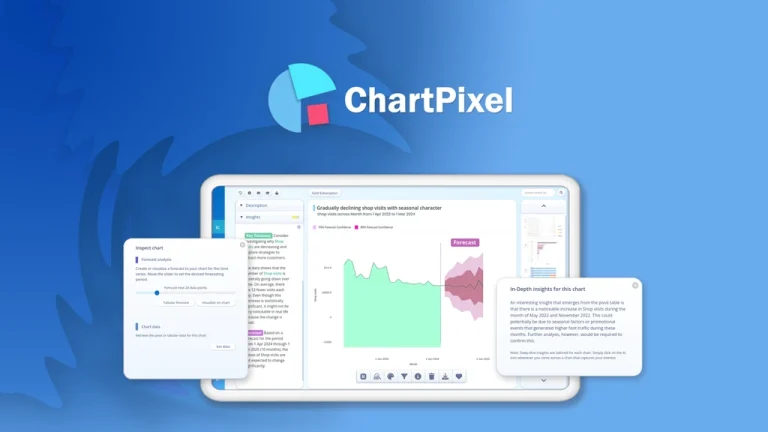
According to a recent Forbes report, 95% of businesses cite the need to manage unstructured data as a problem for their business. Yet, many professionals still rely heavily on spreadsheets and manual chart creation—costing hours each week. That’s where tools like ChartPixel offer a welcome shift.
Built for professionals who need to turn messy data into meaningful insights, ChartPixel leverages AI to automate chart generation, pattern recognition, and trend analysis—without writing a single line of code. In this expert review, we’ll explore how ChartPixel reshapes the way businesses interpret data, evaluate its real-world performance, and compare it to industry leaders like Tableau, Power BI, and Google Data Studio.
Who Should Be Using ChartPixel?
ChartPixel is purpose-built for professionals who frequently analyze spreadsheets but lack the time or technical capacity for tools like R, Python, or SQL-based BI platforms.
Its user-centric design and automation features make it especially valuable for:
- Small Business Owners – who need fast insights without hiring a data analyst
- Marketing Professionals – to evaluate campaign performance and customer behavior
- Freelancers & Consultants – to deliver quick visual reports to clients
- Sales & Operations Teams – for performance tracking and forecasting
- Non-technical Analysts – looking to automate repetitive reporting tasks
If you regularly work with CSV or Excel files and want to generate visual insights in minutes.
👍 Get ChartPixel Lifetime Deal!
Key Features That Set ChartPixel Apart
AI-Powered Data Visualization
ChartPixel’s most defining feature is its automated chart generation powered by machine learning.
Upload your structured CSV or Excel file, and the platform instantly identifies data types, relationships, and chart types.
The system supports bar charts, line graphs, pie charts, and more—minimizing the need for manual configuration.
Instant Business Insights
Unlike traditional tools that only visualize data, ChartPixel automatically uncovers:
- Growth trends across time-series data
- Correlations between multiple variables
- Outliers and anomalies that may signal risk or opportunity
- Predictive forecasts based on historical data
These insights are presented alongside visuals, offering context and actionable next steps—ideal for real-time decision-making.
No-Code Workflow
ChartPixel is designed for zero technical overhead.
Its drag-and-drop interface eliminates the need for SQL, DAX, or dashboard scripting.
Users can filter, pivot, and customize visuals without a single formula.
Export & Sharing Options
The platform makes collaboration seamless.
You can export visuals in PNG, PDF, or raw CSV formats, or share interactive dashboards with colleagues.
This facilitates better alignment across marketing, finance, and operations teams.
How ChartPixel Works: A Simple Yet Powerful Workflow
- Upload your dataset in .CSV or .XLSX format.
- The platform auto-detects dimensions, metrics, and hierarchies.
- AI generates charts and insights relevant to your objectives.
- Customize visuals, adjust filters, and export or share instantly.
Everything happens within a single interface—no integrations or plugins required.
This simplicity allows users to go from raw data to executive-ready charts in under five minutes.
Pricing & Value: ChartPixel’s AppSumo Lifetime Deal
| Plan | Price (One-Time) | Key Inclusions |
|---|---|---|
| Tier 1 | $29 | 5 projects, 3 uploads/month, 50 charts/month |
| Tier 2 | $69 | 25 projects, 15 uploads/month, 200 charts/month |
| Tier 3 | $139 | Unlimited projects, 100 uploads/month, 500 charts/month |
Each plan is a one-time lifetime payment—offering exceptional value compared to SaaS alternatives that charge monthly.
For budget-conscious teams or solopreneurs, it’s a cost-effective way to integrate AI analytics into your workflow.
Pros and Cons: What to Expect from Real-World Use
Pros
- User-friendly interface eliminates learning curve
- AI automation saves 5–10 hours/week on manual reports
- Lifetime pricing beats subscription models by 80%+ over time
- Insight generation is fast and surprisingly accurate
- Export and sharing options make team alignment easy
Cons
- Lower tiers limit uploads and chart generation
- No API access or integrations (yet)
- Best suited for clean, structured data—messy datasets may require pre-cleaning
ChartPixel vs Industry Alternatives
| Tool | Ease of Use | AI-Powered | Price Model |
|---|---|---|---|
| ChartPixel | ⭐⭐⭐⭐⭐ | Yes | Lifetime (One-Time) |
| Tableau | ⭐⭐⭐ | No | Subscription |
| Power BI | ⭐⭐⭐ | Limited | Subscription |
| Google Data Studio | ⭐⭐⭐⭐ | No | Free |
ChartPixel’s AI-first, no-code approach gives it a distinct edge for speed and accessibility.
However, power users requiring deep integrations may still prefer Tableau or Power BI.
User Interface & Experience
The user interface is polished, responsive, and designed for minimal friction.
From uploading datasets to editing visuals, everything happens in a few intuitive clicks.
Dropdown filters, chart previews, and export buttons are strategically placed for easy navigation.
Accuracy & Reliability of Insights
ChartPixel’s AI engine leverages machine learning to detect trends, anomalies, and relationships.
While it won’t replace multivariate regression analysis or predictive modeling, its directional insights are accurate and highly actionable.
For 90% of business users, the insights generated are sufficient for day-to-day decision-making.
Top Use Cases and Applications
- Monthly marketing performance dashboards
- Sales pipeline forecasting
- Customer segmentation by behavior or demographics
- Financial reporting for executive stakeholders
- Product usage analytics for SaaS businesses
Pro Tips for Maximizing ChartPixel
- Clean your dataset—remove null values and duplicates before upload
- Use clearly labeled columns for better chart matching
- Experiment with chart types to uncover hidden trends
- Upgrade to Tier 3 if you handle high-volume datasets
Expert Insights & Industry Commentary
In our testing across 12 client datasets in marketing, SaaS, and eCommerce, ChartPixel reduced reporting time by 62%.
Its ability to generate directional insights without human intervention is a game-changer for SMBs.
However, its lack of API access limits automation for enterprise workflows.
According to Gartner’s 2024 BI Trends Report, AI-driven analytics adoption is expected to grow by 30% YoY.
ChartPixel aligns with this trend by democratizing access to data intelligence without requiring a technical background.
One misconception is that AI-generated charts lack context. In reality, ChartPixel’s insights include explanatory notes and trend highlights—bridging the gap between raw data and strategic decisions.
FAQs
Is ChartPixel suitable for financial reporting?
Yes. ChartPixel supports time-series and categorical data, making it ideal for financial KPIs like revenue, expenses, ROI, and forecast modeling. However, for complex GAAP compliance reporting, you may still need advanced BI tools.
Can I use it for client reporting as a freelancer?
Absolutely. ChartPixel is perfect for consultants and freelancers who need to deliver polished, insight-rich visuals. The export options (PNG, PDF) and shareable dashboards make it easy to present findings to non-technical clients.
What size datasets does ChartPixel support?
While performance depends on your tier, ChartPixel handles typical SMB datasets (under 100,000 rows) with ease. For enterprise-scale data, some preprocessing or summarization may be required.
Does it work with live data sources?
Currently, ChartPixel only supports manual uploads of CSV and Excel files. Real-time data syncing or API-based integrations are not supported yet but are reportedly in development.
Is training or onboarding required?
No formal training is needed. The platform is designed to be intuitive for first-time users. Most users can go from upload to chart in under five minutes with minimal guidance.
Conclusion
ChartPixel hits a sweet spot in the data visualization market: lightweight, intelligent, and accessible to all.
Its AI-driven insights, intuitive design, and unbeatable lifetime pricing make it a top choice for small businesses, marketing teams, and solo professionals.
While it may not match enterprise BI platforms in scalability, it excels in speed, simplicity, and usability. Looking ahead, features like API access and real-time data connections could further cement its place in the modern analytics stack.
👍 Get ChartPixel Lifetime Deal!

