
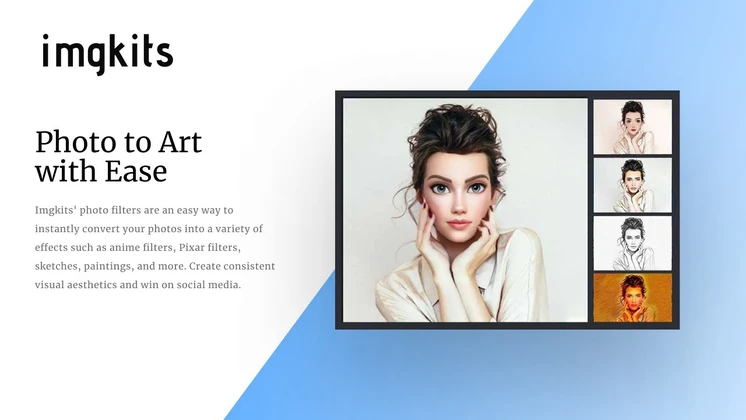
In the ever-evolving world of digital media, high-quality photo editing tools have become indispensable. According to a 2023 survey by Adobe, 85% of digital marketers rely on photo editing software to enhance their visual content. One tool that stands out in this competitive landscape is Imgkits.
This versatile software offers a range of features from watermark removal to photo restoration, catering to the needs of professionals and casual users alike. Whether you are a seasoned photographer or a digital marketer, this review aims to provide you with a comprehensive analysis of Imgkits, highlighting its features, benefits, potential drawbacks, and price details.
What is Imgkits?
Imgkits is an all-in-one photo editing tool designed to simplify and enhance your photo editing process. It offers a variety of functionalities, including watermark removal, background remover, photo to cartoon conversion, photo restoration, and face swap.
With Imgkits, you can transform your photos with ease, making it a valuable tool for various users and businesses. Let’s delve into the key features that make Imgkits stand out.
Key Features of Imgkits
Watermark Remover
One of the standout features of Imgkits is its watermark removal tool. This feature allows you to remove watermarks from images seamlessly, ensuring your photos look professional and clean. For digital marketers and graphic designers, this tool is invaluable as it saves the hassle of manually editing out watermarks, which can be time-consuming and may compromise the image quality.
Background Remover
The background remover tool in Imgkits enables you to remove backgrounds from images effortlessly. This is particularly useful for creating transparent backgrounds or replacing them with new ones. E-commerce businesses can benefit significantly from this feature, as it allows them to showcase products against a clean, professional backdrop, enhancing the overall visual appeal.
Photo to Cartoon
Transform your photos into stunning cartoon art with Imgkits’ photo to cartoon feature. This tool is perfect for adding a fun and creative touch to your images. Social media managers and content creators can leverage this feature to create engaging visuals that captivate their audience.
The ‘cartoonification’ process is straightforward, and the results are often impressive, making it a popular choice for various creative projects.
Photo Restoration
Imgkits also offers a photo restoration feature that allows you to repair old or damaged photos. This tool is ideal for preserving precious memories and restoring them to their former glory. Professional photographers and archivists can use this feature to enhance the quality of vintage photographs, making them suitable for modern use.
Face Swap
The face swap feature in Imgkits lets you swap faces in photos with ease. This can be a fun tool for creating humorous or creative images. Content creators on platforms like TikTok and Instagram can use this feature to generate viral content that resonates with their audience.
The face swap tool is intuitive and easy to use, making it accessible even for those with limited photo editing experience.
Benefits of Using Imgkits
Imgkits offers several benefits that make it a valuable tool for photo editing:
- User-Friendly Interface: Imgkits is designed with a user-friendly interface, making it easy for anyone to use, regardless of their photo editing experience. The intuitive layout ensures that even beginners can navigate the tool effortlessly, making it a popular choice among users with varying skill levels.
- Time-Saving: The tool’s automated features save you time and effort, allowing you to focus on other aspects of your project. For example, the watermark removal and background remover tools can significantly reduce the time spent on manual editing, enabling users to complete projects more efficiently.
- High-Quality Results: Imgkits delivers high-quality results, ensuring your photos look professional and polished. The advanced algorithms used in the tool ensure that the final output is of the highest quality, making it suitable for both personal and professional use.
Potential Drawbacks
While Imgkits offers numerous benefits, it’s important to consider potential drawbacks:
- Some advanced features may require a learning curve. Although the tool is user-friendly, users may need to spend some time familiarizing themselves with the more advanced features to fully utilize their capabilities.
- The tool may not be suitable for users looking for highly specialized editing tasks. For instance, users who require advanced color grading or complex compositing may find the tool lacking in specific functionalities. In such cases, combining Imgkits with other specialized tools may be necessary.
Price Details
Imgkits is available at an affordable price, making it accessible to a wide range of users. The pricing structure is designed to cater to various budgets, ensuring that both individuals and businesses can benefit from the tool without breaking the bank.
Who Would Benefit from Imgkits?
Imgkits is a versatile tool that can benefit a variety of users and businesses, including:
- Professional Photographers: For enhancing and restoring photos. Professional photographers can use Imgkits to remove unwanted elements from their photos, create stunning backgrounds, and restore old photographs, ensuring that their work is of the highest quality.
- Digital Marketers: For creating engaging visual content. Digital marketers can leverage Imgkits to create visually appealing content that captivates their audience. The tool’s various features, such as watermark removal and background remover, can help marketers create professional-looking visuals that enhance their brand image.
- Graphic Designers: For adding creative elements to designs. Graphic designers can use Imgkits to enhance their designs by adding unique elements such as cartoon art or face swaps. The tool’s user-friendly interface and high-quality results make it a valuable addition to any graphic designer’s toolkit.
- Small Businesses: For creating professional-looking visuals for marketing materials. Small businesses can benefit from Imgkits by creating professional-looking visuals that enhance their marketing efforts. The tool’s various features can help businesses create visually appealing content that resonates with their target audience.
Comparison with Similar Tools
To help you make an informed decision, let’s compare Imgkits with some similar tools in the market:
| Feature | Imgkits | Tool A | Tool B |
|---|---|---|---|
| Watermark Removal | Yes | Yes | No |
| Background Remover | Yes | No | Yes |
| Photo to Cartoon | Yes | No | No |
| Photo Restoration | Yes | Yes | No |
| Face Swap | Yes | No | No |
Buyer’s Guide: Tips for Choosing the Right Photo Editing Tool
When choosing a photo editing tool, consider the following tips:
- Assess your specific needs and the features you require. Determine what features are essential for your projects and ensure that the tool you choose offers those functionalities.
- Compare pricing and plans to find the best value for your budget. Evaluate the pricing structure of different tools and select one that offers the best value for your budget.
- Read reviews and testimonials from other users to gauge the tool’s effectiveness. Check out user reviews and testimonials to get an idea of the tool’s performance and reliability.
Actionable Tips for Using Imgkits
Here are some actionable tips to help you get the most out of Imgkits:
- Experiment with different features to understand their capabilities. Try out various features to familiarize yourself with their functionalities and determine how they can enhance your projects.
- Use the watermark remover for professional photos and the background remover for creative projects. Utilize these features to create professional-looking visuals that enhance your projects.
- Leverage the photo to cartoon feature for unique and engaging content. Use this feature to create visually appealing content that captivates your audience.
Expert Insights Section
Industry Trends & Future Outlook
The photo editing industry is constantly evolving, with new trends and technologies emerging regularly. One notable trend is the increasing use of AI and machine learning in photo editing tools. These technologies are enhancing the capabilities of tools like Imgkits, making them more efficient and user-friendly.
Another trend is the rise of mobile photo editing. With the increasing use of smartphones, there is a growing demand for mobile-friendly photo editing tools. Imgkits, with its user-friendly interface and advanced features, is well-positioned to meet this demand.
Looking ahead, we can expect to see more integration of AI and machine learning in photo editing tools. This will likely lead to even more advanced features and improved user experiences. As a result, tools like Imgkits will become even more valuable for users and businesses alike.
Common Industry Misconceptions & Clarifications
There are several misconceptions about photo editing tools that need to be addressed. One common misconception is that photo editing tools are only for professionals. While professional photographers and designers benefit significantly from these tools, they are also valuable for casual users and small businesses.
Imgkits, with its user-friendly interface, is a testament to this fact.
Another misconception is that photo editing tools are expensive. While some high-end tools can be costly, there are many affordable options available, such as Imgkits. These tools offer a range of features at a reasonable price, making them accessible to a wide range of users.
Risk Factors & Implementation Guidance
When implementing a photo editing tool like Imgkits, it’s essential to consider potential risk factors. One risk factor is the learning curve associated with advanced features. Users may need to spend some time familiarizing themselves with these features to fully utilize their capabilities.
Another risk factor is the potential limitations of the tool. While Imgkits offers a range of features, it may not be suitable for highly specialized editing tasks. In such cases, combining Imgkits with other specialized tools may be necessary.
To mitigate these risks, it’s important to assess your specific needs and determine how Imgkits can meet them. Additionally, taking the time to learn the tool’s features and experimenting with different functionalities can help you get the most out of Imgkits.
Frequently Asked Questions (FAQs)
Is Imgkits suitable for beginners?
Yes, Imgkits is designed with a user-friendly interface, making it suitable for beginners and professionals alike. Its intuitive layout ensures that even those with limited photo editing experience can navigate the tool effortlessly.
Can Imgkits be used for commercial purposes?
Yes, Imgkits can be used for commercial purposes, making it a valuable tool for businesses and professionals. Its various features, such as watermark removal and background remover, can help create professional-looking visuals that enhance brand image.
Does Imgkits offer a free trial?
Check the AppSumo product page for the latest information on free trials and pricing. Imgkits often provides opportunities for users to try the tool before making a purchase, allowing them to assess its capabilities and determine if it meets their needs.
What kind of support does Imgkits offer?
Imgkits provides customer support to assist users with any questions or issues they may encounter. Whether you have technical difficulties or need guidance on using the tool’s features, Imgkits’ support team is available to help.
Can Imgkits be integrated with other tools?
Imgkits can be used alongside other photo editing tools to enhance your workflow and achieve the best results. By combining Imgkits with other specialized tools, users can create visually appealing content that meets their specific needs.
Conclusion
Imgkits is a powerful and versatile photo editing tool that offers a range of features to meet the needs of various users and businesses. With its user-friendly interface, high-quality results, and affordable pricing, Imgkits is a valuable addition to any photo editing toolkit. Whether you’re a professional photographer, a digital marketer, or a casual user, Imgkits can help you achieve your photo editing goals with ease.
Try Imgkits today and experience the difference for yourself.

