
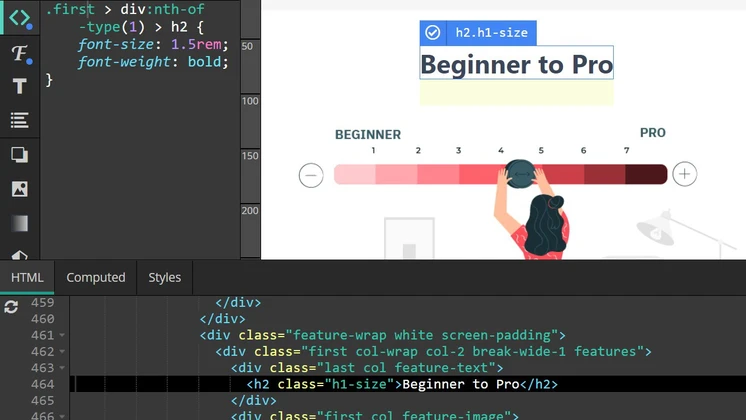
In the ever-evolving landscape of WordPress customization, the need for user-friendly and powerful tools has never been greater. According to W3Techs, WordPress powers over 43% of all websites on the internet. This staggering figure underscores the importance of tools that can help users customize their sites efficiently.
One such tool that stands out is Microthemer. This review dives deep into the features, benefits, and potential drawbacks of Microthemer, providing you with everything you need to make an informed decision.
What is Microthemer?
Microthemer is a robust WordPress plugin designed to empower users to customize the styling of their WordPress sites without requiring any CSS knowledge. This tool caters to a wide range of users, from beginners to experienced developers, offering an intuitive interface and a suite of powerful features. The primary goal of Microthemer is to make it easy for anyone to create a visually appealing website, regardless of their technical expertise.
👍 Get Microthemer Lifetime Deal!
Key Features of Microthemer
Point and Click Editing
One of the standout features of Microthemer is its point-and-click editing capability. This intuitive approach allows users to directly style any element on their WordPress site by simply pointing and clicking. This functionality eliminates the need for coding knowledge, making it accessible for users of all skill levels.
For example, changing the color of a button or adjusting the font size of a heading can be done with a few clicks, saving time and effort.
Responsive Design
In today’s mobile-first world, ensuring your website looks great on all devices is crucial. Microthemer excels in this area by offering responsive design features. These features allow you to adjust styles for different screen sizes, ensuring a seamless user experience across desktops, tablets, and mobile devices.
This is particularly important given that mobile devices accounted for 54.4% of global website traffic in the first quarter of 2021, according to Statista.
CSS Customization
While Microthemer is designed to be user-friendly, it also caters to those who are comfortable with coding. The plugin allows for advanced CSS customization, giving users the flexibility to make detailed adjustments to their site’s design. This dual capability makes Microthemer a versatile tool that can grow with your expertise, offering both simplicity and depth.
Benefits of Using Microthemer
Ease of Use
One of the most significant benefits of Microthemer is its ease of use. The plugin’s intuitive interface makes it accessible for users of all skill levels, from beginners to experienced developers. This accessibility is a key factor in its popularity, as it democratizes web design, allowing anyone to create a professional-looking website without needing to dive into code.
Time-Saving
Microthemer’s point-and-click editing feature is a significant time-saver. By allowing users to make changes directly on their site, it eliminates the need to switch between the WordPress dashboard and the site’s front end. This streamlined process not only saves time but also reduces the complexity of the design process, making it more efficient and less prone to errors.
Flexibility
Microthemer offers a high degree of flexibility, allowing users to customize virtually any element of their site. Whether you need to adjust colors, fonts, or spacing, Microthemer provides the tools to do so. This flexibility is essential for creating a unique and visually appealing website that stands out from the competition.
Potential Drawbacks
Learning Curve
While Microthemer is designed to be user-friendly, there may still be a learning curve for those who are new to WordPress or web design in general. However, the plugin’s comprehensive documentation and support resources can help mitigate this. Additionally, the intuitive nature of the tool means that even beginners can quickly get up to speed with a bit of practice.
Cost
Microthemer is a premium plugin, which means it comes with a cost. While the price may be a barrier for some, the value it provides in terms of time-saving and ease of use may justify the investment for many users. Considering the long-term benefits and the potential to create a professional-looking website without hiring a developer, the cost can be seen as a worthwhile investment.
Pricing Details
Microthemer is available on AppSumo with a special offer. You can find the current price and details on the AppSumo product page.
👍 Get Microthemer Lifetime Deal!
Who Would Benefit from Microthemer?
Microthemer is suitable for a wide range of users, including:
- WordPress beginners who want to customize their site without learning CSS.
- Small business owners looking to create a professional-looking website without hiring a developer.
- Web designers who need a quick and efficient way to make style changes to their clients’ sites.
Microthemer vs. Other WordPress Styling Plugins
To help you make an informed decision, let’s compare Microthemer with some other popular WordPress styling plugins:
| Feature | Microthemer | Elementor | Beaver Builder |
|---|---|---|---|
| Point and Click Editing | Yes | Yes | Yes |
| Responsive Design | Yes | Yes | Yes |
| CSS Customization | Yes | Limited | Limited |
| Ease of Use | High | High | High |
Tips for Getting the Most Out of Microthemer
Start with the Basics
Before diving into complex customizations, take the time to familiarize yourself with Microthemer’s basic features. This will help you build a strong foundation and make the most of the plugin’s capabilities. Understanding the fundamentals will enable you to tackle more advanced tasks with confidence.
Use Responsive Design Features
Ensure your site looks great on all devices by taking advantage of Microthemer’s responsive design features. Adjust styles for different screen sizes to provide a seamless user experience. This is crucial for maintaining user engagement and satisfaction, as a poorly optimized site can lead to high bounce rates and lost opportunities.
Leverage Support Resources
If you encounter any issues or have questions, don’t hesitate to use Microthemer’s support resources. The plugin’s documentation and customer support can help you overcome any challenges you may face. Utilizing these resources can save you time and frustration, allowing you to focus on creating a stunning website.
Expert Insights
In the competitive landscape of WordPress plugins, Microthemer stands out for its blend of simplicity and power. According to a study by CodeinWP, the average WordPress user spends significant time customizing their site. Microthemer addresses this pain point by offering an intuitive and efficient way to make style changes.
This not only saves time but also reduces the complexity of the design process, making it accessible to a broader range of users.
One common misconception is that user-friendly plugins like Microthemer are limited in their capabilities. However, Microthemer’s advanced CSS customization options dispel this myth. The plugin’s ability to cater to both beginners and experienced developers makes it a versatile tool that can grow with your expertise.
This dual capability is a significant advantage in a market where many plugins are either too simplistic or too complex for the average user.
When implementing Microthemer, it’s essential to consider the potential risks and challenges. While the plugin is designed to be user-friendly, there may still be a learning curve for those new to WordPress or web design. Additionally, the cost of the plugin may be a barrier for some users.
However, the value it provides in terms of time-saving and ease of use can justify the investment for many. It’s crucial to weigh these factors against your specific needs and budget before making a decision.
Frequently Asked Questions (FAQs)
Is Microthemer compatible with all WordPress themes?
Yes, Microthemer is designed to work with any WordPress theme, allowing you to customize your site regardless of the theme you’re using. This compatibility ensures that you can use Microthemer with your existing theme or switch themes without losing your customizations.
Do I need to know CSS to use Microthemer?
No, Microthemer is designed to be user-friendly, allowing you to customize your site without any CSS knowledge. However, if you’re comfortable with CSS, you can use it for more advanced customizations. This flexibility makes Microthemer accessible to users of all skill levels.
Can I use Microthemer on multiple sites?
The licensing details for using Microthemer on multiple sites can be found on the AppSumo product page. It’s essential to review the licensing terms to ensure you comply with the usage guidelines.
Is there a free trial available for Microthemer?
Microthemer does not typically offer a free trial, but you can find special offers and discounts on platforms like AppSumo. These offers can provide a cost-effective way to try out the plugin and see if it meets your needs.
What kind of support does Microthemer offer?
Microthemer provides comprehensive support through their documentation and customer service. You can find answers to common questions and get help with any issues you may encounter. This support ensures that you have the resources you need to make the most of the plugin.
Conclusion
Microthemer is a powerful and user-friendly WordPress plugin that allows you to customize the styling of your site without needing to know CSS. With its intuitive interface, responsive design features, and advanced CSS customization options, Microthemer is a valuable tool for anyone looking to enhance their WordPress site’s appearance. Whether you’re a beginner or an experienced developer, Microthemer has something to offer.
Consider giving it a try and see how it can help you create a visually appealing and professional-looking website.

