

Client expectations are evolving fast. According to Salesforce’s “State of the Connected Customer” report, 88% of customers say experience matters as much as products or services. For agencies, freelancers, and service providers, delivering a cohesive, branded client experience isn’t optional—it’s critical.
That’s where tools like Orchestra come into play. As an all-in-one white-label client portal platform, Orchestra promises to unify client communication, task tracking, file sharing, and invoicing under your brand.
This review will dissect the platform’s capabilities, real-world applications, and how it compares with industry leaders. We’ll also evaluate its AppSumo lifetime deal to determine if it’s a smart investment for your agency’s tech stack.
What Is Orchestra?
Orchestra is an all-in-one agency management software designed to streamline your business operations with a customizable, white-label client portal. Perfect for agencies, freelancers, and consultants, Orchestra simplifies project management, client communication, and payment processing, all from a single, user-friendly dashboard.
With features like task tracking, secure document sharing, and integrated payment options (including Stripe), it ensures seamless workflows and professional client experiences. Whether you’re managing one-time projects or recurring subscriptions, Orchestra’s real-time analytics and automation tools help you stay organized, boost efficiency, and scale your agency effortlessly. Discover the power of centralized agency management with Orchestra on AppSumo today!
👍 Get Orchestra Lifetime Deal!
Key Features of Orchestra
Orchestra isn’t just a project management tool—it’s a customizable ecosystem built for modern agencies. Let’s explore its core features in detail:
- White-Label Client Portals: Completely rebrand the portal with your logo, color palette, and custom domain. Clients won’t even know you’re using a third-party tool.
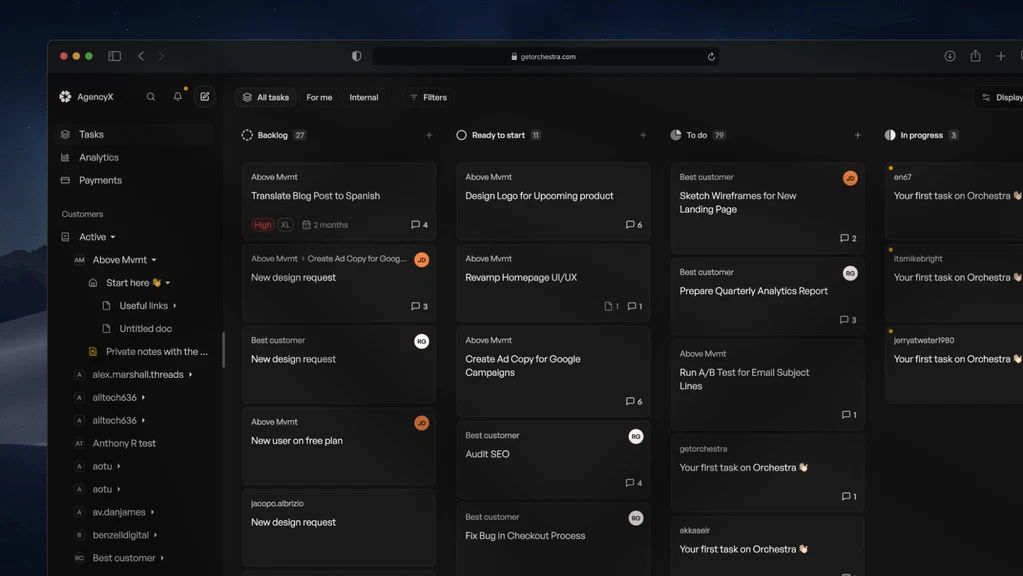
- Task & Project Management: Assign tasks, set deadlines, and track project progress through intuitive boards and lists. Ideal for client deliverables and internal workflows.
- File Sharing & Storage: Securely share contracts, assets, and deliverables. Files are organized by client and project, reducing clutter and confusion.
- Client Communication Hub: Built-in chat and messaging features centralize conversations, preventing scattered communication across emails and tools.
- Invoicing & Billing Tools: Generate branded invoices, track payment status, and sync with client records. No need for third-party invoicing software.
- Calendar & Scheduling: Book meetings directly within the portal and integrate with Google Calendar. Clients can self-schedule, reducing back-and-forth.
- Custom Modules: Build and add your own modules for use cases like onboarding workflows, reporting dashboards, or client-specific tools.
These features are designed to reduce tool switching, improve transparency, and elevate client professionalism—all while keeping your brand front and center.
Pricing: Orchestra via AppSumo (Lifetime Deal)
Orchestra’s pricing structure via AppSumo is what sets it apart. Instead of paying monthly or annually, you pay once and own it for life. Here’s how the tiers break down:
| License Tier | Price | Main Features |
|---|---|---|
| Tier 1 | $69 (one-time) | 5 team members, 25 clients, 10 GB storage, 1 custom domain |
| Tier 2 | $169 (one-time) | 15 team members, 75 clients, 100 GB storage, 3 custom domains |
| Tier 3 | $399 (one-time) | Unlimited team, clients, domains + 200 GB storage |
Each tier scales with your team and client base, making it easy to start small and upgrade as you grow.
Ideal Use Cases: Who Should Use Orchestra?
Orchestra is built for service providers who value client experience and operational efficiency. Its versatility makes it a great fit for:
- Marketing & Digital Agencies: Manage multiple campaigns, assets, and client conversations in one portal.
- Freelancers & Consultants: Present a polished brand experience without building a custom portal.
- Creative Teams & Web Designers: Share revisions, track milestones, and get client sign-offs seamlessly.
- Virtual Assistants: Coordinate calendars, task lists, and billing with multiple clients from one dashboard.
- Coaches & Online Educators: Deliver learning modules, schedule sessions, and manage payments.
If your business involves recurring communication, deliverables, or client collaboration, Orchestra can help you systematize and scale.
Pros and Cons of Orchestra
Pros
- Fully White-Labeled: Reinforces your brand and builds trust with clients.
- Lifetime Access: One-time payment means no ongoing costs or SaaS fatigue.
- Unified Platform: Combines multiple tools—task manager, file sharing, billing, and chat—in one interface.
Cons
- Still Maturing: As a newer platform, it lacks some integrations and features found in legacy systems.
- Learning Curve: Users unfamiliar with client portal software may need time to onboard effectively.
Orchestra vs. Competitors: How It Stacks Up
Here’s a side-by-side comparison of Orchestra with two popular alternatives: SuiteDash and HoneyBook.
| Feature | Orchestra | SuiteDash | HoneyBook |
|---|---|---|---|
| White-Label Branding | Yes (Custom Domain) | Yes | No |
| Lifetime Pricing | Yes (AppSumo) | Yes (Limited Deals) | No (Monthly Only) |
| Client Collaboration | Robust | Robust | Moderate |
| Interface Simplicity | Modern UI | Complex | Intuitive |
Orchestra wins on branding flexibility and pricing. While it may lack some of SuiteDash’s enterprise integrations, it outperforms in usability and cost.
User Experience & Interface Design
Orchestra’s user interface is designed for simplicity. The dashboard is clean, organized, and accessible—even for less tech-savvy clients.
Admins can customize dashboard widgets, use drag-and-drop modules, and quickly access messaging, tasks, or files.
This ease of use reduces friction and enhances client engagement.
Overall, it strikes a balance between professional design and functional utility.
Customization & White-Label Capabilities
A standout feature of Orchestra is its deep customization. From the moment a client logs in, they’re met with your visual identity—not Orchestra’s.
You can apply your brand colors, upload a custom logo, and map the platform to your own domain (e.g., portal.youragency.com).
This not only boosts brand recognition but also improves client trust and perceived professionalism.
Integrations, Compatibility & Limitations
Orchestra currently integrates with essential tools like Google Calendar and file storage services, enabling calendar sync and document sharing.
However, automation platforms like Zapier or Pabbly are needed for advanced workflows and third-party app connections.
It’s fully browser-based and mobile responsive, so there’s no need for native apps or installations.
Security & Data Privacy
Security is non-negotiable in client management software. Orchestra uses SSL encryption for all data transmissions, ensuring client information stays private.
Admin controls allow for granular permission settings.
You can assign roles, limit access, and monitor user activity.
While compliance certifications (e.g., GDPR, SOC 2) are not explicitly listed, the platform adheres to standard best practices in data security.
Best Practices: How to Maximize Orchestra
- Brand First: Set up your logo, domain, and colors before inviting clients. First impressions matter.
- Use Templates: Create reusable task, message, and invoice templates to save time.
- Client Categorization: Use folders or tags to organize clients by project type or priority.
- Leverage Notifications: Enable alerts for upcoming deadlines or file uploads to stay proactive.
- Automate Scheduling: Use the built-in calendar to reduce appointment friction and manual follow-ups.
Expert Insights: Trends, Challenges & Implementation
The client portal market is rapidly evolving, driven by the demand for personalized, secure, and efficient communication. Based on industry trends:
- 82% of agencies plan to adopt or upgrade client-facing portals by 2025 (Source: AgencyVista Report)
- Client retention increases by up to 35% when agencies use branded portals (HubSpot Client Retention Study)
However, implementation can be a challenge. Agencies often struggle with:
- Over-customization: Don’t let branding delay launch—start simple and iterate.
- Low adoption: Train clients on how to use the portal for maximum ROI.
- Feature overload: Focus on core use cases first: communication, tasks, and billing.
Orchestra’s modular design allows phased rollouts, helping teams adapt quickly without overwhelming clients.
FAQs
Does Orchestra have a native mobile app?
No, Orchestra doesn’t offer a standalone mobile app yet. However, its responsive web design ensures full functionality on mobile browsers. You can access all key features—from messaging to invoicing—on your smartphone without limitations.
Can I really use my own domain?
Absolutely. With white-label functionality, you can replace Orchestra’s URL with your own custom domain (e.g., portal.youragency.com). This enhances brand continuity and gives clients a seamless experience from start to finish.
Is Orchestra suitable for solo professionals?
Yes. Solo freelancers and consultants can benefit from Orchestra’s Tier 1 plan. It provides enough capacity (5 team members, 25 clients) and tools like invoicing, scheduling, and file sharing to elevate your client experience without breaking the bank.
Does Orchestra integrate with payment processors?
While Orchestra includes built-in invoicing and payment tracking, direct integration with processors like Stripe or PayPal is limited. However, payment records can be manually captured, and integrations are on the roadmap.
What support is available if I get stuck?
Orchestra offers email support and a growing knowledge base. New users are encouraged to join the community forum and check for tutorial videos. For AppSumo users, lifetime updates and support are also included.
Conclusion
Orchestra is a modern, white-label portal designed to streamline client communication, task management, and billing—all under your own brand. It’s particularly valuable for agencies and freelancers who want to offer a professional, unified client experience without recurring SaaS costs.
Whether you’re managing five clients or 500, Orchestra scales with your needs, offering unlimited growth potential via its Tier 3 plan.
With a clean UI, customizable modules, and lifetime pricing, it delivers true value.
👍 Get Orchestra Lifetime Deal! and start building a smarter, branded client experience today.

