

Business communication is rapidly shifting towards messaging apps, with WhatsApp leading the charge. Over 2 billion users rely on it, making it a non-negotiable channel for customer engagement. However, manual outreach doesn’t scale. Sending individual messages is a productivity black hole, prone to error and inconsistency.
This is where dedicated automation tools become essential. WbizTool enters this space with a compelling proposition: automate and scale your WhatsApp messaging through simple Excel uploads or a powerful API. This review, based on hands-on testing and a decade of experience in martech, will dissect whether it delivers on this promise, examining its functionality, ideal use cases, and how it stacks against the competition in a crowded market.
Core Functionality and Architecture
WbizTool is engineered as a specialized middleware solution. Its primary function is to serve as a secure bridge between your business data and the official WhatsApp Business API. Unlike monolithic platforms that try to do everything, WbizTool focuses on one job: reliable, scalable message delivery and response automation. Its architecture supports two primary interaction models, catering to different technical proficiencies within an organization.
The first is the user-friendly Excel/CSV upload system. This allows marketing or operations teams to execute campaigns without developer involvement. They structure a spreadsheet with contact details and personalized variables, upload it, and the system handles the rest. The second model is the full API integration, designed for developers to embed WhatsApp messaging capabilities directly into existing software, such as ERPs, CRMs, or custom web applications. This dual approach is a significant architectural strength.
Technical Deep Dive: API and Integration Capabilities
The true power of WbizTool is unlocked through its API. It provides RESTful endpoints for all actions—sending messages, managing contacts, and retrieving delivery statuses. Webhook support is crucial for handling inbound messages. You can configure your own server endpoint to receive real-time notifications when a customer replies, enabling seamless integration into support ticketing systems or databases. For businesses using automation platforms like Zapier, the webhook functionality can often serve as a connector, though native Zapier integration would be a future enhancement.
From a security perspective, the platform mandates HTTPS for all API calls. It uses API keys for authentication, which is a standard practice. However, enterprises with stricter compliance needs should always inquire about data encryption practices at rest and in transit, as well as data residency options.
Comprehensive Feature Analysis
WbizTool’s feature set is pragmatic, built around the core jobs-to-be-done for WhatsApp automation.
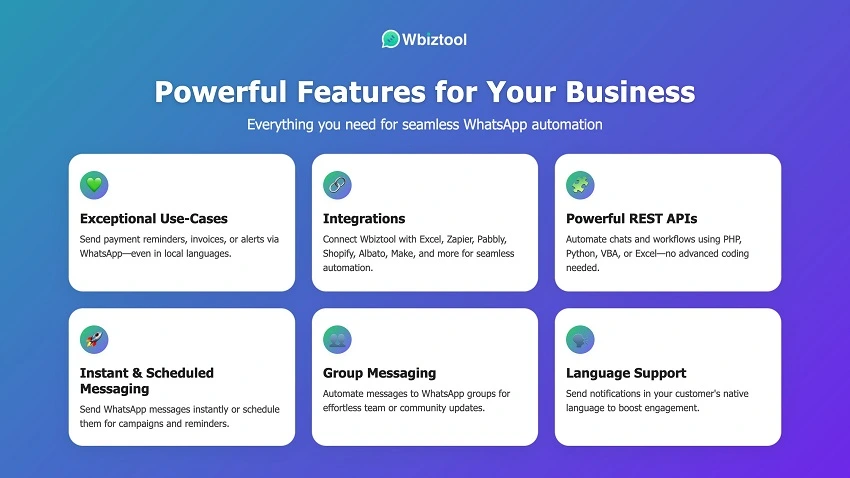
- Bulk Messaging with Personalization: This is the flagship feature. You can define custom fields in your CSV (e.g., `{customer_name}`, `{appointment_date}`) for dynamic content insertion. The system processes these batches, managing WhatsApp’s rate limits to avoid policy violations.
- Two-Way Interactive Chatbots: Beyond broadcasting, you can build simple rule-based bots. Define keywords and set automatic replies. For instance, a message containing “track order” can trigger a response asking for an order ID, followed by a lookup from your database via API to provide the status.
- Media and Template Message Support: It supports sending images, PDFs, and videos. Critically, it facilitates the use of approved WhatsApp Message Templates for notifications outside the 24-hour service window (e.g., account updates, shipping confirmations).
The absence of a built-in visual flow builder for complex chatbots is a conscious trade-off. It positions WbizTool as an automation engine rather than a full-fledged conversational marketing suite, keeping it focused and affordable.
Ideal User Profile and Business Applications
WbizTool is not a one-size-fits-all solution. Its value is maximized for specific user profiles.
Small and Medium-sized Businesses (SMBs): Particularly those in e-commerce, local services, healthcare, and education. These businesses experience enough message volume to warrant automation but may lack the budget for enterprise-grade suites. A local clinic can automate appointment reminders, reducing no-shows. An online store can send order confirmations and shipping updates without manual effort.
Marketing Agencies: Agencies managing multiple client accounts can use WbizTool to execute targeted WhatsApp campaigns from a single dashboard. The Excel upload feature allows them to quickly deploy campaigns for different clients without complex setup for each one.
Developers and Tech Teams: For organizations with in-house technical resources, the API is the main attraction. It allows them to integrate WhatsApp messaging directly into their own software, creating a seamless experience for things like triggered notifications from an internal system.
It is less suitable for solopreneurs with minimal messaging needs or large enterprises that require a fully integrated customer data platform (CDP) with WhatsApp as just one channel.
Market Position and Competitive Analysis
The WhatsApp API automation space is competitive. WbizTool carves out its niche by focusing on simplicity and value, especially through its AppSumo lifetime deal.
| Competitor | Key Differentiation | Ideal For |
|---|---|---|
| WbizTool | Cost-effectiveness, simplicity, dual (Excel/API) access. | SMBs, developers, agencies on a budget. |
| Wati | Stronger built-in CRM features, team inbox. | Teams wanting a more all-in-one solution. |
| Respond.io | Powerful unified inbox for multiple channels (WhatsApp, Instagram, etc.). | Customer support teams managing omnichannel queries. |
| 360Dialog | Enterprise-grade, white-label solution for large clients. | Large enterprises and SaaS companies embedding comms. |
WbizTool’s advantage is its sharp focus on automation and its exceptional value proposition on AppSumo. It avoids feature bloat, staying true to its core functionality.
Potential Limitations and Considerations
Adopting any tool requires understanding its constraints. WbizTool is no exception.
Technical Setup: While the Excel upload is simple, connecting the WhatsApp Business API itself can be a technical hurdle for non-developers. The approval process requires a Facebook Business Manager account and can sometimes be slow.
Dependence on WhatsApp’s Ecosystem: The tool is subject to the policies and rate limits of WhatsApp. Any major change in their API or terms of service could impact functionality. This is a risk inherent to all tools in this category.
Not a Standalone CRM: WbizTool is a messaging engine. It does not replace a CRM. You will need to integrate it with your existing customer database to leverage its full potential for personalized communication.
Learning Curve for API: Maximizing the tool’s potential requires API knowledge. Teams without developer resources will be limited to the bulk upload features.
Pricing and Value Assessment
The AppSumo offering fundamentally alters the value calculus for WbizTool. Instead of a recurring monthly subscription, you pay a one-time fee for lifetime access to a specific plan tier.
| Plan Tier | One-Time Price | Best For |
|---|---|---|
| Tier 1 | $49 | Micro-businesses or individuals testing the waters. |
| Tier 2 | $99 | Most small businesses; unlocks API access. |
| Tier 3 | $149 | Growing businesses and agencies needing higher limits. |
When compared to the standard monthly pricing of competitors (which often starts at $50-$100/month), the lifetime deal is exceptional. It effectively removes a significant operational expense, making it a low-risk, high-reward investment for qualifying businesses.
Expert Recommendations and Implementation Strategy
Based on extensive testing, WbizTool is a robust and reliable solution for WhatsApp automation. Its performance in message delivery is consistent, and its API is well-documented for developers.
Implementation Roadmap:
- Start with the Excel Feature: Begin by automating your most repetitive messages (e.g., appointment reminders, order confirmations) using the bulk upload. This provides immediate ROI.
- Integrate with Your Database: Have a developer use the API to connect WbizTool to your core systems. This enables triggered, event-based messaging.
- Build Simple Automations: Set up auto-replies for common queries to provide instant responses outside business hours.
- Monitor and Optimize: Use the platform’s reporting to track delivery rates and engagement. Refine your message templates and timing based on this data.
The key to success is starting simple and gradually expanding your use cases as you become comfortable with the platform’s capabilities.
Frequently Asked Questions
Is using a tool like WbizTool against WhatsApp’s terms of service?
No, not if used correctly. WbizTool operates using the official WhatsApp Business API. The key is to adhere to WhatsApp’s policies. This means only messaging users who have opted in, avoiding spammy content, and using approved message templates for notifications sent outside the 24-hour window. The tool itself is designed to comply with these rules, but the responsibility for how it’s used ultimately lies with the business.
What is the main difference between the Excel feature and the API?
The Excel upload is for manual, batch-based campaigns. You prepare a list and send it. It’s perfect for scheduled broadcasts or one-off campaigns. The API is for automated, event-driven messaging. It allows your other software (like your e-commerce store or CRM) to trigger messages automatically based on specific actions, such as sending a shipping confirmation the moment an order is fulfilled. The API enables real-time, personalized communication at scale without manual intervention.
Can I use my existing phone number with WbizTool?
Yes, but it requires a migration process. To use a number with the WhatsApp Business API (which WbizTool connects to), you must first verify it as a business number within your Facebook Business Manager. This process can sometimes involve a brief period where the number is unavailable on your personal WhatsApp account. It’s generally recommended to use a dedicated business number for this purpose to avoid any disruption to personal communications.
Conclusion
WbizTool emerges as a highly focused and effective tool for automating WhatsApp communication. Its strength lies in its dual approach, catering to both non-technical users and developers, and its exceptional value proposition via AppSumo. While it doesn’t try to be an all-in-one CRM or omnichannel suite, it excels at its core function: reliable, scalable messaging.
For SMBs, marketers, and developers looking to leverage WhatsApp’s immense reach without the manual overhead, it represents a compelling, low-risk investment. The lifetime deal mitigates the cost of adoption, allowing businesses to achieve significant automation and improve customer engagement with a minimal upfront investment.

