

Welcome to our comprehensive review of WebDiff, a tool designed to quickly compare a website before and after an update, spotting any unwanted changes. This tool is particularly useful for web developers, digital marketers, and IT professionals who need to ensure website integrity and performance. In this review, we will cover all aspects of WebDiff, including its features, benefits, potential drawbacks, and pricing.
What is WebDiff?
WebDiff is a sophisticated tool that leverages advanced algorithms to detect changes on a website. Whether you’re dealing with a minor tweak or a significant overhaul, WebDiff helps you spot discrepancies effortlessly. This tool is perfect for professionals who need to monitor website changes regularly and ensure that updates do not introduce errors or unintended modifications.
Key Features of WebDiff
WebDiff comes packed with a variety of features that make it a standout tool in the market. Here are some of the key features:
-
- Automated Change Detection: WebDiff’s automated change detection feature uses cutting-edge algorithms to identify even the slightest modifications on your website. This ensures that no change goes unnoticed, helping maintain consistency and accuracy.
-
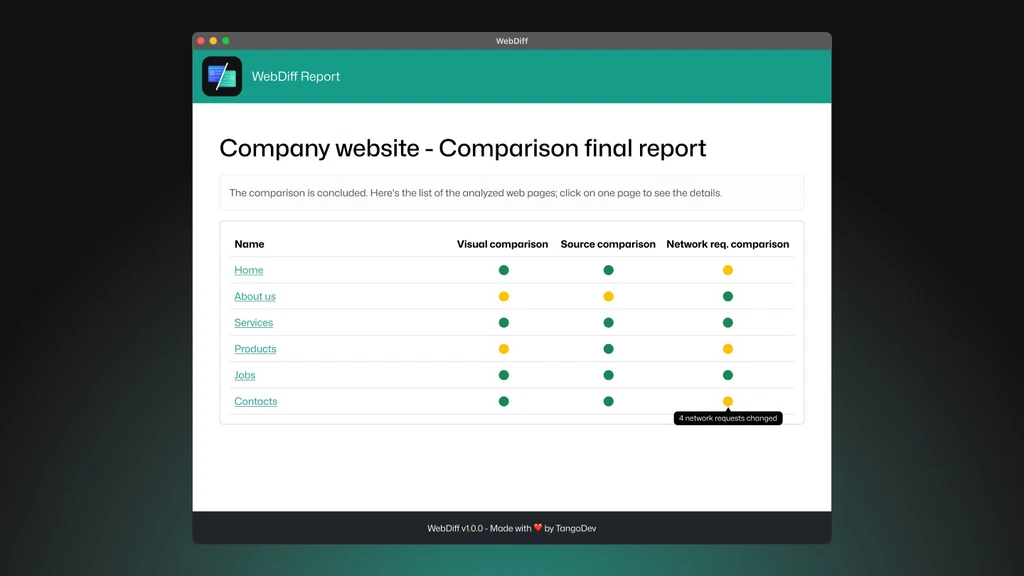
- Visual Comparison Reports: One of WebDiff’s standout features is its visual comparison reports. These reports provide a side-by-side comparison of your website before and after updates, making it easy to spot differences. The visual format is intuitive and user-friendly, ideal for teams that need quick insights.
-
- Customizable Alerts: With customizable alerts, WebDiff allows you to set up notifications for specific changes. This means you can be alerted immediately when critical modifications occur, enabling prompt action and reducing the risk of unnoticed errors.
-
- Integration with CI/CD Pipelines: Seamless integration with CI/CD pipelines is another key feature of WebDiff. This integration ensures that your development and deployment processes are streamlined, with automated checks for website changes at every stage.
- User-Friendly Interface: WebDiff’s user-friendly interface is designed to be accessible to users of all skill levels. The intuitive design makes it easy to navigate and use, reducing the learning curve for new users.
Benefits of Using WebDiff
WebDiff offers numerous benefits that can significantly enhance your workflow. Here are some of the top advantages:
-
- Saves Time and Effort: By automating the change detection process, WebDiff saves valuable time and effort. Manual checks are time-consuming and prone to human error. WebDiff’s automated approach ensures efficient and accurate monitoring.
-
- Ensures Consistency and Accuracy: Consistency and accuracy are crucial for maintaining website integrity. WebDiff ensures that all changes are detected and reviewed, preventing inconsistencies and errors that could affect user experience.
-
- Improves Website Performance: Regular monitoring of website changes helps identify and fix performance issues quickly. WebDiff’s detailed reports allow you to pinpoint areas that need improvement, leading to better overall performance.
-
- Enhances User Experience: A well-maintained website provides a better user experience. WebDiff helps ensure that updates do not introduce issues that could negatively impact users, maintaining a smooth and enjoyable browsing experience.
- Facilitates Collaboration: WebDiff’s features, such as customizable alerts and integration with CI/CD pipelines, facilitate better collaboration among team members. Everyone stays informed about changes, ensuring a coordinated effort.
Potential Drawbacks
While WebDiff is a powerful tool, it is not without its drawbacks. Here are a few points to consider:
-
- Learning Curve for New Users: Although WebDiff is designed to be user-friendly, new users may still face a learning curve. The tool’s advanced features might require some time to master, especially for those not familiar with change detection tools.
-
- Pricing May Be a Concern for Small Teams: The pricing plans for WebDiff might be a concern for smaller teams or businesses with limited budgets. The basic plan offers essential features, but the more advanced plans can be costly.
- Limited Integration Options: While WebDiff offers integration with popular CI/CD pipelines, some users may find the integration options limited. Ensuring compatibility with all tools in your workflow is crucial.
👍 Get WebDiff Lifetime Deal!
Who Can Benefit from WebDiff?
WebDiff is suitable for a wide range of users, including:
-
- Web Developers: For web developers, WebDiff is an invaluable tool for monitoring changes and ensuring that updates do not introduce errors. The automated change detection and visual reports make it easy to identify and fix issues quickly.
-
- Digital Marketers: Digital marketers can benefit from WebDiff by ensuring that website changes do not negatively impact SEO or user experience. The tool helps maintain consistency and accuracy, which are crucial for effective digital marketing strategies.
-
- IT Professionals: IT professionals need to ensure that website updates are smooth and error-free. WebDiff’s features, such as integration with CI/CD pipelines, make it a valuable tool for maintaining website integrity.
-
- SEO Specialists: For SEO specialists, WebDiff is essential for monitoring changes that could affect search engine rankings. The tool helps identify any issues that could impact SEO, ensuring that the website remains optimized.
- Content Managers: Content managers can use WebDiff to ensure that content updates are consistent and accurate. The tool helps monitor changes and identify any discrepancies, maintaining the quality of the website’s content.
How to Get Started with WebDiff
Getting started with WebDiff is straightforward. Here are the steps:
- Sign Up for an Account
- Choose Your Plan
- Set Up Your Website for Monitoring
- Customize Your Alerts
- Start Monitoring Changes
FAQs
Is WebDiff Suitable for Small Businesses?
Yes, WebDiff offers plans that are affordable for small businesses and provide essential features to monitor website changes effectively. The basic plan, priced at $49/month, includes 100 comparisons per month, making it a cost-effective solution for small teams.
Can WebDiff Integrate with My Existing Tools?
WebDiff offers integration with popular CI/CD pipelines and other tools, making it easy to incorporate into your existing workflow. This seamless integration ensures that your development and deployment processes are streamlined, with automated checks for website changes at every stage.
How Accurate is WebDiff’s Change Detection?
WebDiff uses advanced algorithms to ensure high accuracy in change detection, minimizing false positives and negatives. The tool’s automated approach ensures efficient and accurate monitoring, identifying even the slightest modifications on your website.
Does WebDiff Offer a Free Trial?
Yes, WebDiff offers a free trial period, allowing you to test the tool before committing to a paid plan. This trial gives you the opportunity to experience WebDiff’s features firsthand and determine if it meets your needs.
What Kind of Support Does WebDiff Provide?
WebDiff provides comprehensive support, including documentation, tutorials, and customer support to help you get the most out of the tool. Whether you need assistance with setup, customization, or troubleshooting, WebDiff’s support team is there to assist you.
How Does WebDiff Ensure Data Security?
WebDiff ensures data security through robust encryption and secure data storage practices. The tool adheres to industry standards for data protection, ensuring that your website data is safe and secure. WebDiff’s commitment to data security provides peace of mind for users.
Conclusion
WebDiff is a powerful tool for anyone who needs to monitor and compare website changes. With its robust features, user-friendly interface, and competitive pricing, it stands out as a top choice in the market. Whether you’re a web developer, digital marketer, or IT professional, WebDiff can help you ensure website integrity and performance.
To get the most out of WebDiff, consider the following tips: regularly review alerts, customize your settings, integrate with your workflow, leverage visual reports, and stay updated with new features. By implementing these strategies, you can maximize the benefits of WebDiff and ensure that your website remains consistent, accurate, and high-performing. Take the first step towards enhancing your website monitoring today by starting with WebDiff.

