
In today’s digital age, video content is more pervasive than ever. According to a report by Cisco, video will account for 82% of all internet traffic by 2022. This trend underscores the critical need for efficient video management tools.
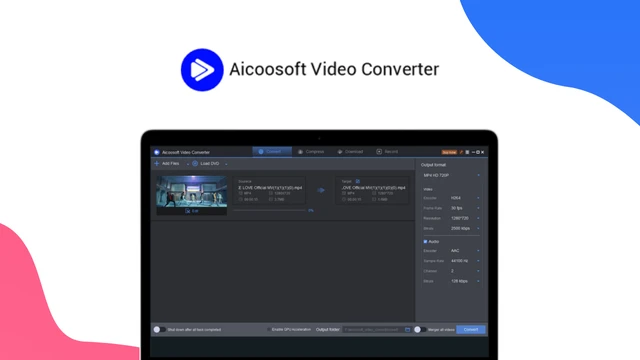
One such tool that stands out is Aicoosoft Video Converter. This comprehensive guide delves into the intricacies of Aicoosoft Video Converter, exploring its features, benefits, drawbacks, and more. Whether you’re a professional video editor or a casual user, this review will equip you with the knowledge to make an informed decision.
Understanding Aicoosoft Video Converter
Aicoosoft Video Converter is a robust software designed to handle a variety of video-related tasks, including conversion, editing, compression, downloading, recording, and DVD conversion. This versatility makes it a valuable asset for both professionals and amateurs. Let’s explore its core features in detail.
Key Features of Aicoosoft Video Converter
Video Conversion
One of the standout features of Aicoosoft Video Converter is its ability to convert videos into over 1000 different formats. This ensures compatibility with virtually any device or platform. The conversion process is not only fast but also maintains the original video quality.
This makes it ideal for converting videos for various uses, from social media posts to professional presentations.
The software supports popular formats like MP4, AVI, MKV, and MOV, among others. Its batch conversion feature allows users to convert multiple videos simultaneously, saving time and effort.
Video Editing
Aicoosoft Video Converter also offers a suite of video editing tools. Users can crop, trim, rotate, and add effects to their videos with ease. The software comes with a range of filters, watermarks, and subtitle options to enhance your videos.
The user-friendly interface makes these editing features accessible even for beginners.
For instance, you can quickly crop out unnecessary parts of a video, trim the length to fit specific time constraints, or add subtitles for better accessibility. The software’s intuitive design ensures that even those with limited editing experience can achieve professional results.
Video Compression
Large video files can be cumbersome to store and share. Aicoosoft Video Converter addresses this issue with its efficient video compression feature. It allows users to reduce file sizes without compromising the original resolution and quality.
This is particularly useful for those who need to share videos online or store them on devices with limited storage.
The compression process is straightforward. Users can select the desired output size, and the software automatically adjusts the settings to achieve the best possible quality within the specified size. This feature is invaluable for content creators who need to upload videos to platforms with file size limitations.
Video Downloading
Downloading videos from the internet can be a hassle, especially with the variety of platforms available. Aicoosoft Video Converter simplifies this process by supporting downloads from popular sites like YouTube, Facebook, and Vimeo. With a single click, users can save high-quality videos for offline viewing.
This feature is particularly beneficial for educators who need to download educational videos for classroom use, or for content creators who want to save reference material. The software ensures that the downloaded videos maintain their original quality, making them suitable for various applications.
Screen Recording
Aicoosoft Video Converter also includes a screen recording feature, perfect for creating tutorials, presentations, and capturing live streams. The recording settings are customizable, allowing users to optimize performance based on their needs.
For example, you can record your screen in high definition to create professional-quality tutorials. The software also allows you to record system audio and microphone input simultaneously, making it ideal for creating voice-over presentations or live commentary videos.
DVD Conversion
For those who still have a collection of DVDs, Aicoosoft Video Converter offers an easy way to convert them to digital formats. This feature preserves the quality of your DVDs while converting them to a more accessible format. It’s an excellent tool for backing up your DVD collection digitally for long-term storage.
The process is straightforward. Simply insert the DVD, and the software will handle the conversion. You can choose from various output formats, ensuring that your digitized DVDs are compatible with your preferred devices.
👍 Get Aicoosoft Video Converter Lifetime Deal!
Benefits of Using Aicoosoft Video Converter
Aicoosoft Video Converter offers several advantages that set it apart from other tools:
- Ease of Use: The software boasts a user-friendly interface, making it accessible for users of all skill levels.
- High-Quality Output: Whether you’re converting, editing, or compressing videos, Aicoosoft ensures that the output quality remains high.
- Time-Saving: With fast conversion and compression speeds, the software helps users save valuable time.
- Versatility: Support for a wide range of formats ensures that the software can meet diverse user needs.
- Reliable Support: The company offers responsive customer support, ensuring that any issues you encounter are quickly resolved.
Potential Drawbacks
While Aicoosoft Video Converter has many strengths, there are a few potential drawbacks to consider:
- Cost: The software may be more expensive compared to some free alternatives. However, the value it offers often justifies the price.
- Learning Curve: Some advanced features may require a learning curve for beginners. The built-in tutorials and guides can help mitigate this.
- Limited Customization: Certain features may have limited customization options, which could be a drawback for users needing more control.
Pricing Details
The pricing for Aicoosoft Video Converter is as follows:
- One-time Purchase: $49.99
- Subscription Plans: $19.99/month or $39.99/year
Discounts are available through AppSumo. Check the latest deals.
Who Would Benefit from This Tool?
Aicoosoft Video Converter is suitable for a wide range of users, including:
- Professional Video Editors: Those needing efficient and high-quality tools for their work.
- Content Creators: Individuals looking to enhance their videos with editing and compression features.
- Businesses: Organizations needing to convert and compress videos for presentations and marketing materials.
- Casual Users: Those wanting to download and convert videos for personal use.
- Educators: Teachers creating video tutorials and lectures for educational purposes.
Buyer’s Guide: What to Consider
When considering Aicoosoft Video Converter, keep these factors in mind:
- Specific Needs: Assess your specific needs for video conversion, editing, and compression.
- Budget: Consider your budget constraints and the value offered by the tool.
- Ease of Use: Evaluate the learning curve for advanced features and the overall usability.
- Customer Support: Ensure that the software comes with reliable customer support.
Comparisons with Other Tools
To help you make an informed decision, here’s a comparison of Aicoosoft Video Converter with other popular tools:
- HandBrake: Free and open-source, but may require more technical knowledge to use effectively.
- Wondershare UniConverter: Offers similar features but may be more expensive.
- Freemake Video Converter: Free but with limited features compared to Aicoosoft.
Actionable Tips for Using Aicoosoft Video Converter
Here are some tips to get the most out of Aicoosoft Video Converter:
- Update Regularly: Always update to the latest version for new features and bug fixes.
- Experiment with Settings: Experiment with different settings to find the best balance between quality and file size.
- Utilize Guides: Utilize the built-in tutorials and guides for a smoother learning experience.
FAQs
Is Aicoosoft Video Converter free?
No, Aicoosoft Video Converter is a paid tool. However, it offers a free trial version with limited features, allowing users to test its capabilities before purchasing.
Can I use Aicoosoft Video Converter on multiple devices?
Yes, you can use Aicoosoft Video Converter on multiple devices with a single license, depending on the plan you choose. This flexibility is particularly useful for users who work across different devices.
What formats does Aicoosoft Video Converter support?
Aicoosoft Video Converter supports over 1000 formats, including popular ones like MP4, AVI, MKV, MOV, and more. This extensive support ensures compatibility with a wide range of devices and platforms.
Does Aicoosoft Video Converter work on Mac?
Yes, Aicoosoft Video Converter is compatible with both Windows and Mac operating systems. This cross-platform compatibility makes it a versatile tool for users with different operating systems.
How do I contact Aicoosoft customer support?
You can contact Aicoosoft customer support through their official website or via email. They offer responsive and helpful assistance, ensuring that any issues you encounter are quickly resolved.
Expert Insights
The video industry is rapidly evolving, with new formats and technologies emerging regularly. Aicoosoft Video Converter stands out as a tool that adapts to these changes, offering regular updates and new features. Its comprehensive suite of tools makes it a valuable asset for both professionals and amateurs.
One common misconception is that video conversion tools are only for professionals. However, Aicoosoft Video Converter’s user-friendly interface and extensive support make it accessible for casual users as well. The software’s ability to maintain high-quality output across all features is a testament to its technical prowess.
When implementing Aicoosoft Video Converter, it’s essential to consider your specific needs and budget. The software’s versatility and high-quality output make it a worthwhile investment for those who need reliable video management tools.
Conclusion
Aicoosoft Video Converter is a versatile and powerful tool that caters to a wide range of video needs. Whether you’re a professional or a casual user, this software offers features and benefits that make it a valuable addition to your toolkit. Consider your specific needs and budget when deciding if Aicoosoft Video Converter is the right choice for you.
For those looking to enhance their video management capabilities, Aicoosoft Video Converter provides a robust solution. Its comprehensive features, high-quality output, and user-friendly interface make it a standout choice in the market. 👍 Get Aicoosoft Video Converter Lifetime Deal!

