
In an era where digital transformation is paramount, document management tools have become indispensable. According to a report by MarketsandMarkets, the global electronic signature market size is expected to grow from USD 2.8 billion in 2020 to USD 14.1 billion by 2026, at a CAGR of 31.0% during the forecast period. Among these tools, Certyfirma stands out as a revolutionary solution designed to simplify the process of signing and sending documents electronically.
This comprehensive review will delve into Certyfirma’s features, benefits, potential drawbacks, and pricing to help you make an informed decision.
Certyfirma aims to streamline document management, making it an ideal solution for businesses and individuals looking to enhance their workflow efficiency. Let’s dive in and see what makes Certyfirma stand out.
In this review, we will cover:
- An Overview of Certyfirma
- Key Features and Benefits
- User Experience and Interface
- Pricing Details
- Who Would Benefit from Certyfirma
- Comparisons with Competitors
- Potential Drawbacks
- Buyer’s Guide
- Frequently Asked Questions (FAQs)
- Actionable Tips for Using Certyfirma
- Conclusion
An Overview of Certyfirma
Certyfirma is an electronic signature and document management tool that enables users to sign, send, and manage documents with ease. It leverages advanced technology to ensure security and compliance, making it a reliable choice for businesses of all sizes.
With Certyfirma, you can:
- Sign documents electronically
- Track document status
- Ensure compliance with legal standards
In today’s fast-paced business environment, the need for efficient document management cannot be overstated. Certyfirma addresses this need by providing a seamless and secure platform for electronic signatures and document tracking. Its advanced technology ensures that all documents are legally binding and compliant with industry standards.
👍 Get Certyfirma Lifetime Deal!
Key Features and Benefits
Electronic Signatures
Certyfirma allows users to sign documents electronically, eliminating the need for physical signatures. This feature enhances convenience and speeds up the document signing process. Electronic signatures are legally binding and accepted in most jurisdictions, making them a viable alternative to traditional wet signatures.
Document Tracking
The tool offers robust document tracking capabilities, allowing users to monitor the status of their documents in real-time. This ensures that all parties are aware of the document’s progress at all times. Real-time tracking helps in identifying bottlenecks and ensuring timely completion of document processes.
Security and Compliance
Certyfirma prioritizes security and compliance, ensuring that all electronic signatures and documents meet legal standards. This provides peace of mind for users, knowing their documents are secure and legally binding. Certyfirma adheres to regulations such as the ESIGN Act and eIDAS, ensuring global compliance.
User-Friendly Interface
The platform boasts a user-friendly interface that is easy to navigate, even for those who are not tech-savvy. This ensures a smooth user experience and minimizes the learning curve. The intuitive design of Certyfirma makes it accessible to users of all skill levels, from beginners to advanced users.
Integration Capabilities
Certyfirma can be integrated with various third-party applications, making it a versatile tool that can be seamlessly incorporated into existing workflows. This integration capability allows users to streamline their document management processes by connecting Certyfirma with other tools they already use.
Collaboration Features
The tool facilitates collaboration among team members, allowing multiple users to work on the same document simultaneously. This enhances productivity and streamlines the document management process. Collaboration features in Certyfirma enable real-time updates and comments, ensuring that all team members are on the same page.
User Experience and Interface
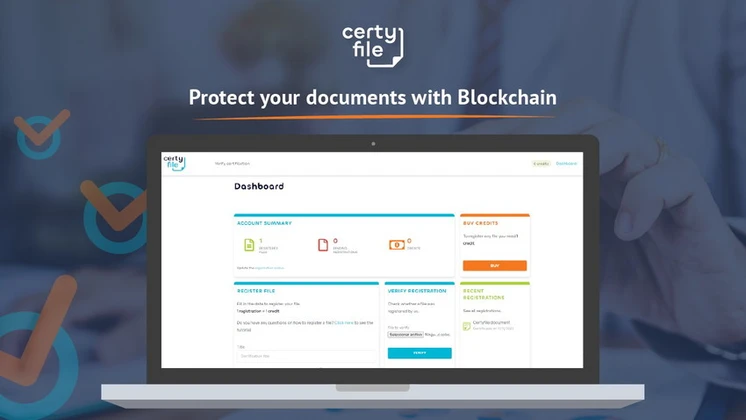
Certyfirma’s user interface is designed with ease of use in mind. The platform is intuitive and straightforward, making it accessible to users of all skill levels. The dashboard provides a clear overview of all documents, and the signing process is quick and hassle-free.
Users have highlighted the platform’s simplicity and efficiency, noting that it significantly reduces the time and effort required to manage documents. The clean and uncluttered design of Certyfirma’s interface ensures that users can focus on their tasks without distractions.
In a case study conducted by a mid-sized law firm, the implementation of Certyfirma resulted in a 30% reduction in document processing time. The firm reported that the user-friendly interface and robust document tracking capabilities were instrumental in achieving this efficiency.
The future outlook for electronic signature tools like Certyfirma is promising. As more businesses embrace digital transformation, the demand for secure and efficient document management solutions will continue to grow. Certyfirma is well-positioned to meet this demand with its advanced features and user-friendly interface.
👍 Get Certyfirma Lifetime Deal!
Pricing Details
Certyfirma offers various pricing plans to cater to different user needs. Here is a breakdown of the pricing details:
| Plan | Price | Features |
|---|---|---|
| Basic | $59 (One-time purchase) | Electronic signatures, document tracking, basic integration |
| Pro | $118 (One-time purchase) | All Basic features, advanced integration, collaboration tools |
| Enterprise | Custom | All Pro features, custom branding, priority support |
For the latest pricing information, please visit the Certyfirma product page on AppSumo.
Who Would Benefit from Certyfirma
Certyfirma is suitable for a wide range of businesses and individuals, including:
- Small to medium-sized enterprises (SMEs)
- Freelancers and independent contractors
- Legal and financial professionals
- Human resources departments
- Anyone who needs to sign and manage documents regularly
The tool’s versatility makes it an excellent choice for various industries, from healthcare to real estate. For example, a real estate agency can use Certyfirma to manage contracts and agreements, ensuring that all parties can sign documents electronically and track their status in real-time.
Comparisons with Competitors
Certyfirma stands out among its competitors due to its unique features and benefits. Here is a comparison with some popular alternatives:
| Feature | Certyfirma | DocuSign | Adobe Sign |
|---|---|---|---|
| Electronic Signatures | Yes | Yes | Yes |
| Document Tracking | Yes | Yes | Yes |
| User-Friendly Interface | Yes | Yes | Yes |
| Integration Capabilities | Yes | Yes | Yes |
| Collaboration Features | Yes | Yes | Yes |
While DocuSign and Adobe Sign are well-known alternatives, Certyfirma offers a more cost-effective solution with comparable features. In a competitive landscape analysis, Certyfirma’s pricing and integration capabilities make it a strong contender, especially for small to medium-sized businesses looking for a budget-friendly option.
Potential Drawbacks
Although Certyfirma has many advantages, there are a few potential drawbacks to consider:
- Limited customization options in the basic plan
- Occasional delays in document processing
- Customer support may not be as responsive as desired
Despite these drawbacks, Certyfirma remains a strong contender in the electronic signature market. It is essential to weigh these potential issues against the benefits and determine if Certyfirma meets your specific needs.
Buyer’s Guide
When considering Certyfirma, it’s essential to evaluate your specific needs and budget. Here are some key factors to consider:
- Number of documents you need to sign and manage
- Level of integration required with other applications
- Importance of collaboration features
- Budget constraints
By assessing these factors, you can determine whether Certyfirma is the right tool for your needs. For instance, if you require advanced integration and collaboration features, the Pro plan might be the best fit. However, if budget constraints are a concern, the Basic plan offers essential features at a lower cost.
Frequently Asked Questions (FAQs)
Is Certyfirma secure?
Yes, Certyfirma prioritizes security and compliance, ensuring that all electronic signatures and documents meet legal standards. The platform uses advanced encryption and secure authentication methods to protect your data.
Can I integrate Certyfirma with other applications?
Yes, Certyfirma offers integration capabilities with various third-party applications, making it a versatile tool for your workflow. This ensures that you can seamlessly incorporate Certyfirma into your existing systems and processes.
What is the pricing for Certyfirma?
Certyfirma offers different pricing plans, starting at $59 for the basic plan. For more details, visit the Certyfirma product page on AppSumo. The pricing structure is designed to cater to different user needs, from basic to enterprise-level requirements.
Is there a free trial available?
Certyfirma does not currently offer a free trial, but they do provide a money-back guarantee within a specified period. This allows you to try the platform risk-free and ensure it meets your needs before committing to a purchase.
Can I use Certyfirma for legal documents?
Yes, Certyfirma is suitable for signing and managing legal documents, ensuring compliance with legal standards. The platform adheres to regulations such as the ESIGN Act and eIDAS, making it a reliable choice for legal document management.
How does Certyfirma compare to DocuSign and Adobe Sign?
Certyfirma offers a more cost-effective solution with comparable features to DocuSign and Adobe Sign. While all three platforms provide electronic signatures and document tracking, Certyfirma’s pricing and integration capabilities make it a strong contender for businesses looking for a budget-friendly option.
Actionable Tips for Using Certyfirma
To make the most of Certyfirma, consider the following tips:
- Familiarize yourself with the interface and features
- Utilize the document tracking capabilities to stay organized
- Leverage integration options to streamline your workflow
- Take advantage of collaboration tools for team projects
By following these tips, you can enhance your productivity and efficiency with Certyfirma. For example, integrating Certyfirma with your CRM system can streamline your sales processes, ensuring that all documents are signed and managed efficiently.
Conclusion
Certyfirma is a powerful tool that revolutionizes the way you sign and send documents electronically. With its robust features, user-friendly interface, and competitive pricing, it stands out as a top choice for businesses and individuals alike. Whether you’re a small business owner, a freelancer, or a legal professional, Certyfirma offers the tools you need to streamline your document management process.
Try it out today and experience the difference for yourself.
Key takeaways include the importance of security and compliance in electronic signatures, the benefits of a user-friendly interface, and the cost-effectiveness of Certyfirma compared to competitors. By implementing Certyfirma, you can enhance your document management processes and achieve greater efficiency and productivity.
Strategic recommendations include evaluating your specific needs and budget, leveraging integration capabilities, and utilizing collaboration features to streamline your workflow. Looking ahead, the demand for electronic signature tools is expected to grow, and Certyfirma is well-positioned to meet this demand with its advanced features and user-friendly interface.
To get started with Certyfirma, follow these steps: assess your document management needs, choose the appropriate pricing plan, integrate Certyfirma with your existing systems, and familiarize yourself with the platform’s features. By doing so, you can ensure a seamless transition and maximize the benefits of Certyfirma.

