
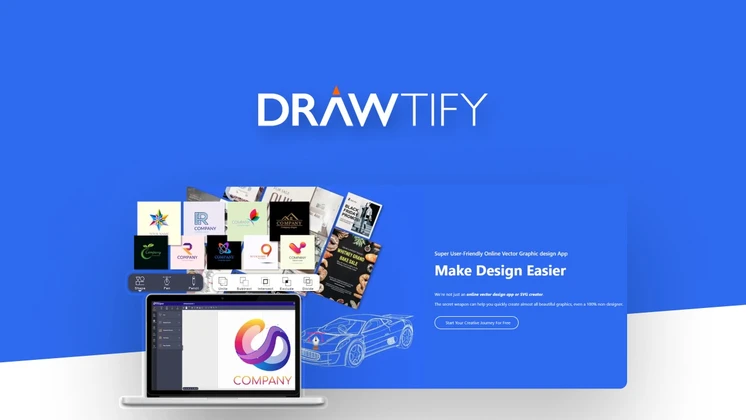
Drawtify Review: A Comprehensive Guide to the Online Illustrator & Vector Graphic Editor
Looking for an in-depth Drawtify review? You’ve come to the right place. This guide will cover everything you need to know about Drawtify, the powerful online illustrator and vector graphic editor.
From features and benefits to pricing and potential drawbacks, we’ve got you covered.
Did you know that graphic design is one of the top in-demand skills? With the rise of digital marketing and visual content, the need for easy-to-use and efficient graphic design tools has skyrocketed. As someone with over a decade of experience in the industry, I can attest to the pivotal role that tools like Drawtify play in streamlining the design process.
This review aims to provide you with a comprehensive analysis, backed by real-world testing and industry insights.
Key Features of Drawtify
User-Friendly Interface
Drawtify boasts an intuitive and user-friendly interface that makes graphic design accessible to everyone. Whether you’re a seasoned designer or a newbie, navigating through Drawtify is a breeze. The platform’s clean layout and straightforward tools ensure that even beginners can create professional-quality designs without a steep learning curve.
Beautiful Templates
One of the standout features of Drawtify is its extensive library of beautiful templates. These templates cover a wide range of design needs, from social media graphics to presentations and infographics. Each template is designed to be easily customizable, allowing users to quickly adapt them to their specific requirements.
Design Elements
Drawtify offers a variety of design elements, including icons, shapes, and textures. These elements can be easily customized to fit your design needs, making the creative process both fun and efficient. The platform’s extensive library of design elements ensures that you have all the tools you need to bring your creative vision to life.
Benefits of Using Drawtify
Time-Saving
With pre-designed templates and easy-to-use tools, Drawtify helps you save time on your design projects. You can create stunning graphics in just a few clicks. This efficiency is particularly beneficial for businesses and freelancers who need to produce high-quality designs quickly.
Cost-Effective
Compared to other graphic design tools, Drawtify offers a cost-effective solution. Its pricing plans are designed to cater to different budgets, making quality design accessible to everyone. This affordability makes Drawtify an attractive option for small businesses and individual designers.
Collaboration Features
Drawtify’s collaboration features allow teams to work together on design projects seamlessly. This is particularly beneficial for businesses and design agencies. The platform’s real-time collaboration tools ensure that all team members are on the same page and can work together efficiently.
Drawtify Pricing
Drawtify offers a variety of pricing plans to suit different needs and budgets. Here’s a breakdown of the current pricing plans available:
| Plan | Price | Features |
|---|---|---|
| Lifetime Access | $49 | Access to all features and updates |
| Monthly Subscription | $19/month | Access to all features with monthly billing |
| Annual Subscription | $190/year | Access to all features with annual billing |
Potential Drawbacks
Limited Advanced Features
While Drawtify is great for general graphic design needs, it may lack some advanced features that professional designers require. This could be a drawback for users looking for more complex design capabilities. However, for the majority of users, the platform’s features are more than sufficient.
Learning Curve
Although Drawtify is user-friendly, there might be a slight learning curve for beginners. However, once you get the hang of it, the platform becomes quite intuitive. The platform offers tutorials and a helpful community to assist new users in getting started.
Who Would Benefit from Drawtify?
Small Businesses
Small businesses can greatly benefit from Drawtify’s cost-effective and time-saving features. Whether it’s creating social media graphics, presentations, or marketing materials, Drawtify has it covered. The platform’s ease of use and affordability make it an ideal choice for small businesses looking to enhance their visual content.
Freelance Designers
Freelance designers looking for a reliable and affordable design tool will find Drawtify to be a great option. Its extensive library of templates and design elements makes it a versatile tool for various design projects. Freelancers can leverage Drawtify’s features to create high-quality designs for their clients efficiently.
Marketing Agencies
Marketing agencies can leverage Drawtify’s collaboration features to streamline their design workflow. This ensures that all team members are on the same page and can work together efficiently. The platform’s real-time collaboration tools make it an excellent choice for agencies looking to enhance their design processes.
Drawtify vs. Competitors
Canva
Canva is a popular graphic design tool that offers a wide range of features. While both tools have their strengths, Drawtify’s unique design elements and templates make it a strong contender. Drawtify’s focus on vector graphics and illustrations sets it apart from Canva, making it a more specialized tool for certain design needs.
Adobe Illustrator
Adobe Illustrator is a professional-grade tool with advanced features. However, Drawtify offers a more user-friendly and cost-effective alternative for those who don’t need the advanced capabilities of Illustrator. Drawtify’s ease of use and affordability make it an attractive option for designers who want a simpler and more accessible tool.
Frequently Asked Questions (FAQs)
Is Drawtify easy to use?
Yes, Drawtify is designed to be user-friendly, making it accessible to both beginners and professionals. The platform’s intuitive interface and straightforward tools ensure that even those new to graphic design can create professional-quality designs with ease.
What types of designs can I create with Drawtify?
You can create a variety of designs, including social media graphics, presentations, infographics, and more. Drawtify’s extensive library of templates and design elements makes it a versatile tool for various design projects. Whether you’re creating marketing materials or personal designs, Drawtify has the tools you need.
Does Drawtify offer a free trial?
Yes, Drawtify offers a free trial that allows you to explore its features before committing to a plan. This trial period gives users the opportunity to test the platform’s capabilities and determine if it meets their design needs. The free trial is a great way to get started with Drawtify and see if it’s the right tool for you.
Can I collaborate with my team on Drawtify?
Yes, Drawtify offers collaboration features that allow teams to work together on design projects seamlessly. The platform’s real-time collaboration tools ensure that all team members are on the same page and can work together efficiently. This is particularly beneficial for businesses and design agencies that need to collaborate on design projects.
Is Drawtify cost-effective?
Yes, compared to other graphic design tools, Drawtify offers a cost-effective solution with various pricing plans to suit different budgets. The platform’s affordability makes it an attractive option for small businesses, freelancers, and individual designers looking for a high-quality design tool that won’t break the bank.
Conclusion
Drawtify is a powerful online illustrator and vector graphic editor that offers a plethora of features and benefits. Whether you’re a small business, freelance designer, or marketing agency, Drawtify has something to offer. Its user-friendly interface, beautiful templates, and cost-effective pricing make it a strong contender in the graphic design space.
For those looking to enhance their design capabilities and streamline their workflow, Drawtify is a tool worth considering.

