Yes, you can sell digital products on eBay. However, eBay has specific guidelines for listing digital goods.
Selling digital products on eBay offers a profitable opportunity for creators and entrepreneurs. Digital products include eBooks, software, music, and printable items. These items don’t require shipping, making the transaction process smoother. EBay’s platform reaches millions of potential buyers, providing a vast audience for your digital goods.
Ensure your listings comply with eBay’s digital product policies to avoid any issues. Use high-quality images and detailed descriptions to attract buyers. Optimize your listings with relevant keywords to enhance visibility. Selling digital products on eBay can be a lucrative venture if you follow the platform’s rules and best practices.
Introduction To Selling Digital Products On Ebay
eBay is a great platform for selling digital products. It’s user-friendly and has a large customer base. This guide helps you start selling digital products on eBay.
What Are Digital Products?
Digital products are items you can sell online without shipping. These include:
- eBooks: PDF files or Kindle formats.
- Software: Applications or tools for computers and phones.
- Music: MP3 files and other audio formats.
- Courses: Online classes and tutorials.
- Graphics: Images, logos, and design templates.
Why Choose Ebay?
eBay offers many benefits for selling digital products. Here are some reasons:
| Reason | Description |
|---|---|
| Large Audience | eBay has millions of users worldwide. |
| Easy Setup | Creating a listing is quick and simple. |
| Low Fees | eBay charges lower fees than some other platforms. |
| Trust | eBay is a trusted marketplace. |
These advantages make eBay a top choice for digital products.
Setting Up Your Ebay Account
Selling digital products on eBay can be profitable. To start, you must set up your eBay account. This section will guide you through creating a seller account and configuring payment methods.
Creating A Seller Account
First, visit the eBay website. Click on the Register button to create a new account. Fill in your details like name, email, and password. Verify your email address through the link sent to you.
Next, click on Sell at the top of the page. Follow the prompts to convert your account into a seller account. You will need to provide more details, such as your address and phone number.
eBay might ask for additional verification. This is to ensure your account’s security. Once verified, you can start listing your digital products.
Configuring Payment Methods
To receive payments, you must set up your payment methods. Go to your Account Settings and click on Payments. Link your PayPal account or bank account.
Ensure that your payment methods are verified. This will help in smooth transactions. You can also set up automatic transfers to your bank account.
It’s important to keep your payment information updated. This ensures you receive your earnings without any issues.
Listing Digital Products
Selling digital products on eBay can be a great way to earn money. It requires a good strategy for listing. Understanding how to list your digital products effectively is crucial.
Product Descriptions
A good product description helps your item stand out. Use clear and concise language. Highlight the key features of your digital product. Include the benefits buyers will get.
- Use bullet points for important features.
- Keep sentences short and simple.
- Use keywords that buyers might search for.
For example, if you are selling an eBook, mention the main topics covered. Explain how it helps the reader. Make sure to proofread your description. Errors can turn buyers away.
Effective Pricing Strategies
Setting the right price is important for attracting buyers. Research what similar products are selling for on eBay. Aim to offer a competitive price. Consider offering discounts for bulk purchases.
| Product Type | Average Price Range |
|---|---|
| eBooks | $5 – $20 |
| Software | $10 – $100 |
| Printable Art | $2 – $15 |
Offer special promotions to attract more buyers. For example, give a discount on the first purchase. Use clear and attractive pricing information in your listing.
Managing Digital Deliveries
Managing digital deliveries on eBay requires careful attention to detail. Ensuring smooth and timely delivery is crucial for customer satisfaction. Let’s explore effective strategies for handling digital deliveries.
Automating Deliveries
Automation simplifies the delivery process. It saves time and reduces errors. Use tools that automatically send digital products after purchase.
- Integrate delivery tools with eBay.
- Use eBay’s API for seamless automation.
- Set up automatic email notifications.
By automating deliveries, customers receive their products instantly. This leads to better reviews and repeat customers.
Handling Customer Queries
Responding to customer queries promptly is essential. Quick responses build trust and improve satisfaction.
| Query Type | Response Time | Action |
|---|---|---|
| Delivery Issues | Within 24 hours | Resend the product, if necessary. |
| Technical Support | Within 48 hours | Provide step-by-step instructions. |
Use clear and simple language in your responses. This ensures customers understand and resolve their issues quickly.
Include a FAQ section in your product description. This can preemptively address common questions and reduce the number of queries.
Ensuring Compliance With Ebay Policies
Selling digital products on eBay can be a lucrative venture. However, it’s essential to follow eBay’s policies to avoid any issues. This section will guide you through the rules and common pitfalls.
Ebay’s Digital Product Rules
eBay has specific rules for digital products. Sellers must comply with these to ensure a smooth selling process.
- Allowed Formats: Only certain formats are allowed, such as PDFs and eBooks.
- Delivery Methods: Digital products must be delivered via email or direct download links.
- Prohibited Items: Some digital items, like software keys, are not allowed.
Make sure to read eBay’s policy page for digital products. This will help you understand what you can and cannot sell.
Avoiding Common Pitfalls
Many sellers face issues because they overlook some key points. Here are some common pitfalls to avoid:
- Misleading Descriptions: Always provide accurate and detailed descriptions.
- Improper Delivery: Ensure the product is delivered as per eBay’s guidelines.
- Unauthorized Content: Do not sell content you don’t own or have rights to.
By following these tips, you can avoid common mistakes and ensure compliance with eBay’s policies.
Credit: marksight.com
Marketing Your Digital Products
Marketing digital products on eBay requires a strategic approach. You need to make sure your listings reach the right audience. Let’s explore key strategies for marketing your digital products effectively.
Optimizing Listings For Seo
SEO optimization is essential for visibility on eBay. Use relevant keywords in your product titles and descriptions. This will help potential buyers find your products easily.
- Include primary keywords in the title.
- Use long-tail keywords in the description.
- Incorporate bullet points to highlight features.
Here is an example of a well-optimized product title:
Ultimate Guide to Digital Marketing - eBook, PDF, Download
Remember to use high-quality images and clear descriptions. This will improve your search rankings and attract more buyers.
Leveraging Social Media
Social media is a powerful tool for marketing digital products. Share your eBay listings on platforms like Facebook, Instagram, and Twitter. This will increase your reach and drive more traffic to your listings.
- Create engaging posts with eye-catching visuals.
- Use relevant hashtags to reach a broader audience.
- Engage with your followers through comments and messages.
Consider running paid ads on social media. Paid ads can help you target specific demographics and increase your sales.
| Platform | Strategy |
|---|---|
| Share listings in relevant groups | |
| Use stories to showcase products | |
| Tweet with trending hashtags |
Using these strategies can significantly enhance your marketing efforts. You will be able to reach a wider audience and boost your sales.

Credit: www.youtube.com
Frequently Asked Questions
Can You Sell Digital Products On Ebay?
Yes, eBay allows selling digital products like eBooks, software, and digital art.
How To List Digital Products On Ebay?
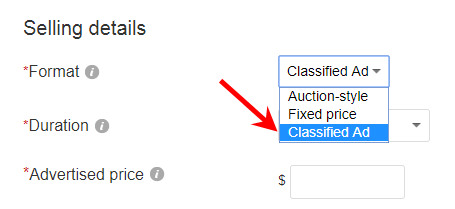
Use eBay’s classified ad format. Describe the product clearly and upload relevant files.
What Digital Products Sell Well On Ebay?
Popular digital products include eBooks, software, digital art, and online courses.
Are There Fees For Selling Digital Products?
Yes, eBay charges listing and final value fees for digital products, similar to physical items.
Conclusion
Selling digital products on eBay offers a unique opportunity. It allows you to reach a vast audience. Ensure compliance with eBay’s policies to avoid issues. Optimize your listings for better visibility and sales. With the right approach, eBay can be a profitable platform for digital goods.