
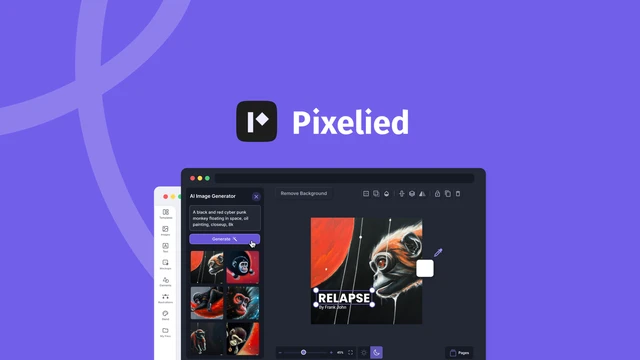
Welcome to our in-depth review of Pixelied
In the fast-paced world of digital marketing and design, the need for efficient and effective graphic design tools is more pronounced than ever. According to a recent study by the Content Marketing Institute, visual content is 40 times more likely to be shared on social media than other types of content. This underscores the importance of visually appealing graphics for branding and engagement.
Enter Pixelied, an AI-powered design suite that promises to revolutionize the way we create eye-catching graphics in minutes. Whether you’re a graphic designer, marketer, or small business owner, this tool aims to streamline your creative process and help you achieve professional results without advanced design skills. Let’s dive into the features, benefits, potential drawbacks, and pricing details to help you decide if Pixelied is the right tool for you.
What is Pixelied?
Pixelied is an AI-powered design tool tailored to help users create stunning graphics quickly and easily. From social media posts to blog images, Pixelied offers an extensive range of templates and design elements to cater to various needs. This tool is particularly beneficial for those who want to produce professional-looking graphics without requiring advanced design skills.
Key Features of Pixelied
AI-Powered Design Tools
One of the standout features of Pixelied is its use of artificial intelligence to assist in the design process. This includes:
- Automatic color suggestions: Pixelied’s AI can recommend color schemes that are visually appealing and cohesive with your brand identity.
- Smart layout adjustments: The tool automatically adjusts layouts to ensure optimal use of space and alignment, enhancing the overall aesthetic.
- Intelligent template recommendations: Based on your design requirements, Pixelied suggests templates that best fit your needs, saving you time and effort.
Extensive Template Library
Pixelied boasts a vast library of templates for various use cases, including social media graphics, blog images, and more. The templates are fully customizable, allowing users to tweak them to fit their branding needs. This feature is particularly useful for small businesses and marketers who need to create a variety of graphics quickly.
Easy-to-Use Interface
The user interface of Pixelied is designed to be intuitive and user-friendly. Even those with minimal design experience can create professional-looking graphics with ease. The interface includes drag-and-drop functionality, making it simple to add and manipulate design elements.
Benefits of Using Pixelied
Time-Saving Design Process
Pixelied’s AI-powered tools and extensive template library help users save time on the design process. This is beneficial for businesses that need to produce a high volume of graphics regularly. According to a survey by Adobe, designers spend an average of 17 hours per week on repetitive tasks.
Pixelied’s efficiency can significantly reduce this time, allowing designers to focus on more creative aspects.
Cost-Effective Solution
Compared to hiring a professional designer or purchasing expensive design software, Pixelied offers a cost-effective solution for creating high-quality graphics. A study by Deloitte found that small businesses can save up to 30% on design costs by using tools like Pixelied.
Flexibility and Customization
With Pixelied, users have the flexibility to customize templates to fit their specific needs. This ensures that the graphics created align with the brand’s identity and messaging. Customization options include font styles, color palettes, and branding elements, making it easy to maintain a consistent visual language.
Potential Drawbacks
Limited Advanced Features
While Pixelied is excellent for quick and easy graphic creation, it may lack some advanced features that professional designers require. For complex design projects, users might need to use additional tools or software. However, for most everyday design needs, Pixelied offers a robust set of features.
Subscription Model
Pixelied operates on a subscription model, which might be a drawback for users who prefer a one-time purchase. However, the subscription model ensures continuous updates and new features. This can be particularly beneficial for users who want to stay up-to-date with the latest design trends and tools.
Pricing Details
Pixelied offers a range of pricing plans to suit different needs and budgets. The current pricing details can be found on the AppSumo product page. Here is a summary of the available plans:
| Plan | Price | Features |
|---|---|---|
| Free Plan | $0 | Basic features and limited templates |
| Pro Plan | $12/month | Unlimited templates, AI-powered tools, and more |
| Team Plan | $24/month | Collaboration tools, priority support, and additional features |
Who Would Benefit from Pixelied?
Pixelied is suitable for a wide range of users, including:
- Small business owners who need to create graphics for marketing and branding.
- Marketers and social media managers who require a steady stream of visual content.
- Bloggers and content creators who want to enhance their posts with eye-catching images.
- Designers looking for a quick and efficient way to create graphics.
Comparisons with Other Design Tools
Pixelied vs. Canva
Canva is a popular design tool that offers similar features to Pixelied. However, Pixelied’s AI-powered tools and user-friendly interface make it a strong competitor. Pixelied also offers more customization options compared to Canva, making it a better choice for users who need more control over their designs.
Pixelied vs. Adobe Spark
Adobe Spark is another design tool that allows users to create graphics quickly. While Adobe Spark offers a range of templates and design elements, Pixelied’s AI-powered features provide a more streamlined design process. This makes Pixelied a more efficient tool for users who need to create graphics frequently.
Expert Insights
Data-Driven Observations & Research-Backed Insights
The design industry is constantly evolving, and tools like Pixelied are at the forefront of this evolution. According to a report by the Global Web Index, 54% of consumers want more video content from brands they support. This trend highlights the importance of visually engaging content, which Pixelied can help create efficiently.
Competitive Landscape Analysis
In the competitive landscape of design tools, Pixelied stands out due to its AI-powered features and user-friendly interface. While tools like Canva and Adobe Spark offer robust features, Pixelied’s focus on efficiency and customization sets it apart. Additionally, Pixelied’s subscription model ensures continuous updates, keeping it ahead of the curve.
Common Industry Misconceptions & Clarifications
One common misconception is that AI-powered design tools can replace human designers. While tools like Pixelied can streamline the design process, they are best used as supplements to human creativity. Professional designers can use Pixelied to handle repetitive tasks, freeing up time for more creative work.
Risk Factors & Implementation Guidance
When implementing Pixelied, it’s important to consider the potential risks. Users should ensure that they have a backup of their designs, as relying solely on cloud-based tools can be risky. Additionally, users should familiarize themselves with the tool’s features to maximize efficiency.
Pixelied offers tutorials and a help center to assist users in getting started.
FAQs
Is Pixelied easy to use for beginners?
Yes, Pixelied is designed to be user-friendly, even for those with minimal design experience. The intuitive interface and AI-powered tools make it easy to create professional-looking graphics. The drag-and-drop functionality and customizable templates further simplify the design process for beginners.
Does Pixelied offer a free trial?
Yes, Pixelied offers a free trial that allows users to explore the basic features and limited templates. For more advanced features, users can upgrade to a paid plan. The free trial is a great way to get a feel for the tool and decide if it meets your design needs.
Can I collaborate with others using Pixelied?
Yes, Pixelied’s Team Plan includes collaboration tools that allow multiple users to work on projects together. This is particularly useful for teams and agencies that need to collaborate on design projects. The collaboration features ensure that everyone is on the same page, making the design process more efficient.
Is Pixelied suitable for professional designers?
While Pixelied offers a range of design tools, professional designers might find it lacking in advanced features. However, it can still be a useful tool for quick and efficient graphic creation. For complex design projects, professional designers may need to use additional tools or software.
What is the customer support like for Pixelied?
Pixelied offers priority support for users on the Team Plan. For other plans, customer support is available through email and a help center with FAQs and tutorials. The help center is a valuable resource for users who need assistance with the tool’s features or have questions about their designs.
Conclusion
Pixelied is a powerful AI-powered design suite that offers a range of features to help users create eye-catching graphics quickly and easily. With its user-friendly interface, extensive template library, and cost-effective pricing plans, Pixelied is an excellent tool for small businesses, marketers, and content creators. While it may lack some advanced features, its AI-powered tools and customization options make it a strong competitor in the design tool market.
For those looking to streamline their design process and create professional-looking graphics efficiently, Pixelied is a tool worth considering. Its continuous updates and new features ensure that users stay ahead of the curve in the ever-evolving design industry.

